📖 Lesson content
Summary
This walkthrough demonstrates the complete RAG (Retrieval-Augmented Generation) implementation using a practical example. We'll build a vector database from scratch and execute all five steps of the RAG workflow using a sample report document.
Setting Up the Vector Database
The implementation uses a custom VectorIndex class that handles storing embeddings and performing similarity searches. This class provides the core functionality we need for our vector database operations.
The Five-Step RAG Implementation
Step 1: Chunk the Text by Section
First, we load and chunk our source document using the same section-based chunking approach from earlier:
with open("./report.md", "r") as f:
    text = f.read()

chunks = chunk_by_section(text)
This breaks our report into logical sections that can be processed independently.
Step 2: Generate Embeddings for Each Chunk
Next, we create embeddings for every chunk using a list comprehension:
embeddings = [generate_embedding(chunk) for chunk in chunks]
This step involves multiple API calls, so it takes some time to complete. Each chunk gets converted into a numerical vector representation.
Step 3: Store Embeddings in the Vector Database
Now we create our vector store and populate it with both embeddings and their associated text:
store = VectorIndex()

for embedding, chunk in zip(embeddings, chunks):
    store.add_vector(embedding, {"content": chunk})
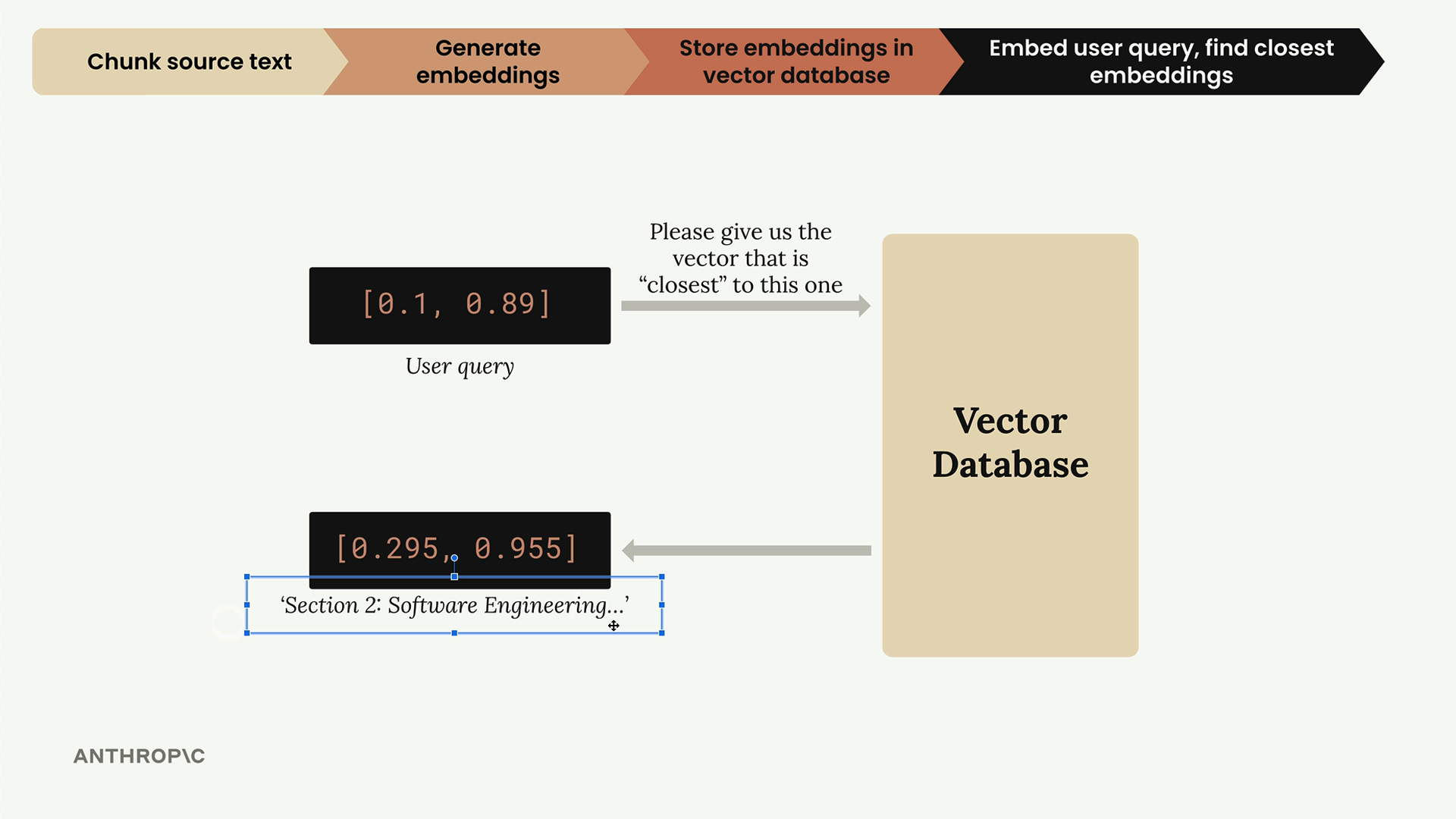
The key insight here is that we store both the embedding and the original text. Just getting back a list of numbers isn't useful - we need the actual text content that corresponds to those embeddings. This metadata allows us to retrieve meaningful results later.
Step 4: Generate User Query Embedding
When a user asks a question, we convert it to the same embedding format:
user_embedding = generate_embedding("What did the software engineering dept do last year?")
This creates a vector representation of the user's question that can be compared against our stored embeddings.
Step 5: Search and Retrieve Relevant Chunks
Finally, we search our vector store to find the most similar content:
results = store.search(user_embedding, 2)

for doc, distance in results:
    print(distance, "\n", doc["content"][0:200], "\n")
This returns the two most relevant chunks along with their cosine distance scores. Lower distances indicate higher similarity.
Understanding the Results
The search returns results ranked by relevance. In our example, the software engineering section had the lowest distance (0.71), making it the most relevant match. The methodology section came second with a distance of 0.72.
The distance metric helps you understand how confident the system is about the relevance of each result. Closer distances mean better matches to the user's query.
Why Store Text with Embeddings
A crucial design decision is storing the original text alongside each embedding. Without this, you'd only get back arrays of numbers, which aren't useful for generating responses. By including the source text, you can immediately use the retrieved chunks to provide context for your language model.
This completes the core RAG workflow, though there are additional optimizations and improvements that can enhance performance in real-world scenarios.
Downloads
🔁 Related lessons
- Next: BM25 lexical search
- Previous: The full RAG flow
- Same section: Overview of Claude Models · Accessing the API · Making a request
- Part of paths: Path C
- Reference docs: Glossary · Skills atlas · By use-case
📚 Source & attribution
- Original Anthropic Academy lesson: https://anthropic.skilljar.com/claude-in-amazon-bedrock/276781
- © 2025 Anthropic. Educational fair-use only.