📖 Lesson content
Summary
Earlier in this course, we covered how to get structured output from Claude using message pre-fills and stop sequences. While that approach works well and is easy to set up, we can get more reliable output using tools. This method is more complex to implement, but it provides better consistency when extracting structured data like JSON.
Why Learn Both Approaches?
You might wonder why we didn't just start with tools if they're more reliable. The answer is simple: tools require significantly more setup and complexity. Having both techniques available gives you flexibility - sometimes you'll want the quick prompt-based approach, other times you'll need the reliability that tools provide.
How Tool-Based Structured Output Works
The core concept is straightforward: instead of asking Claude to format its response as JSON, you create a tool whose input parameters match the exact structure of data you want to extract. Claude then "calls" this tool with the extracted data as arguments.
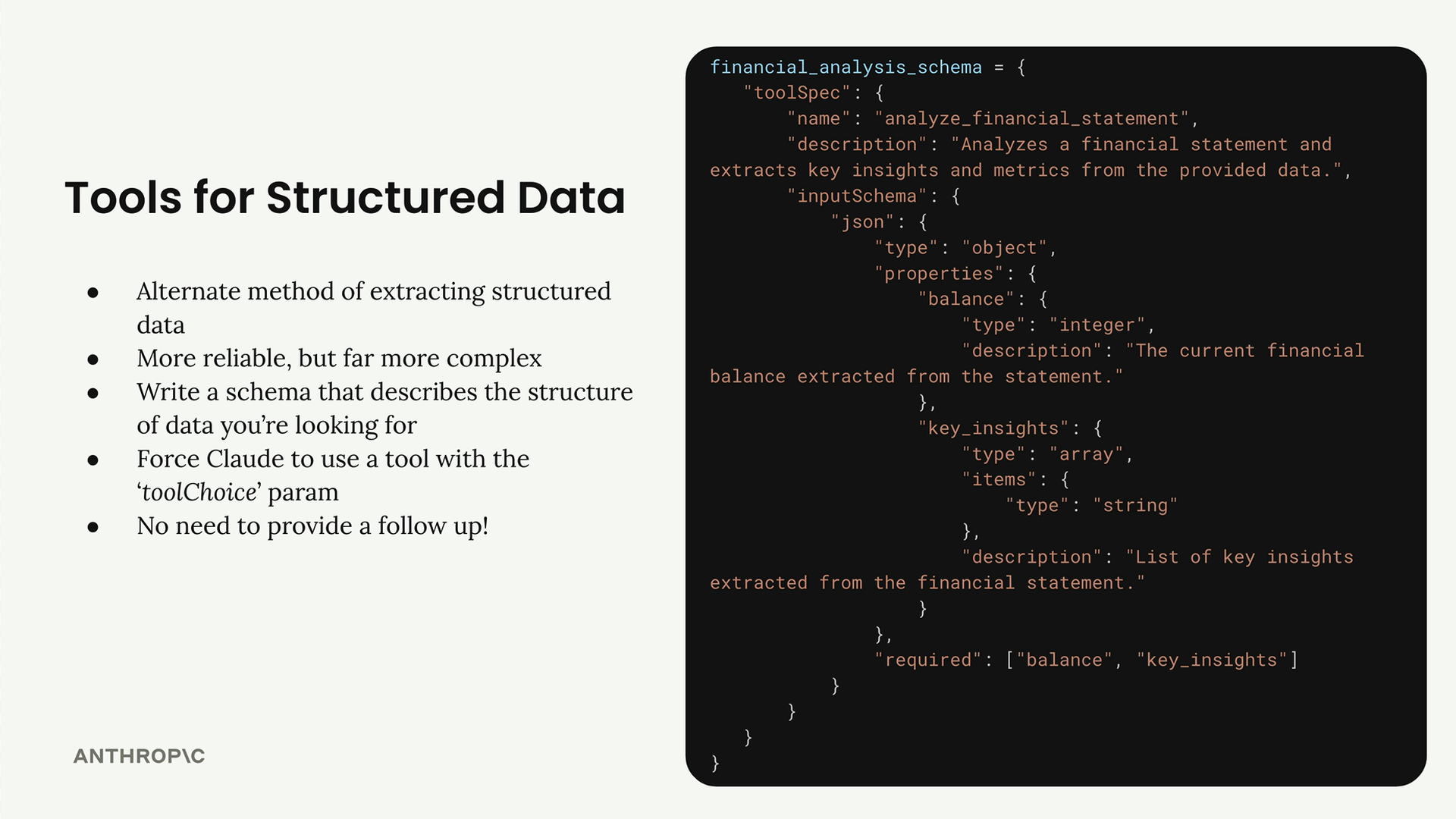
Here's the process:
- Write a JSON schema that describes the structure of data you want
- Create a tool with that schema as its input specification
- Send your data and the tool schema to Claude
- Force Claude to use the tool with the
toolChoiceparameter - Extract the structured data from the tool call arguments
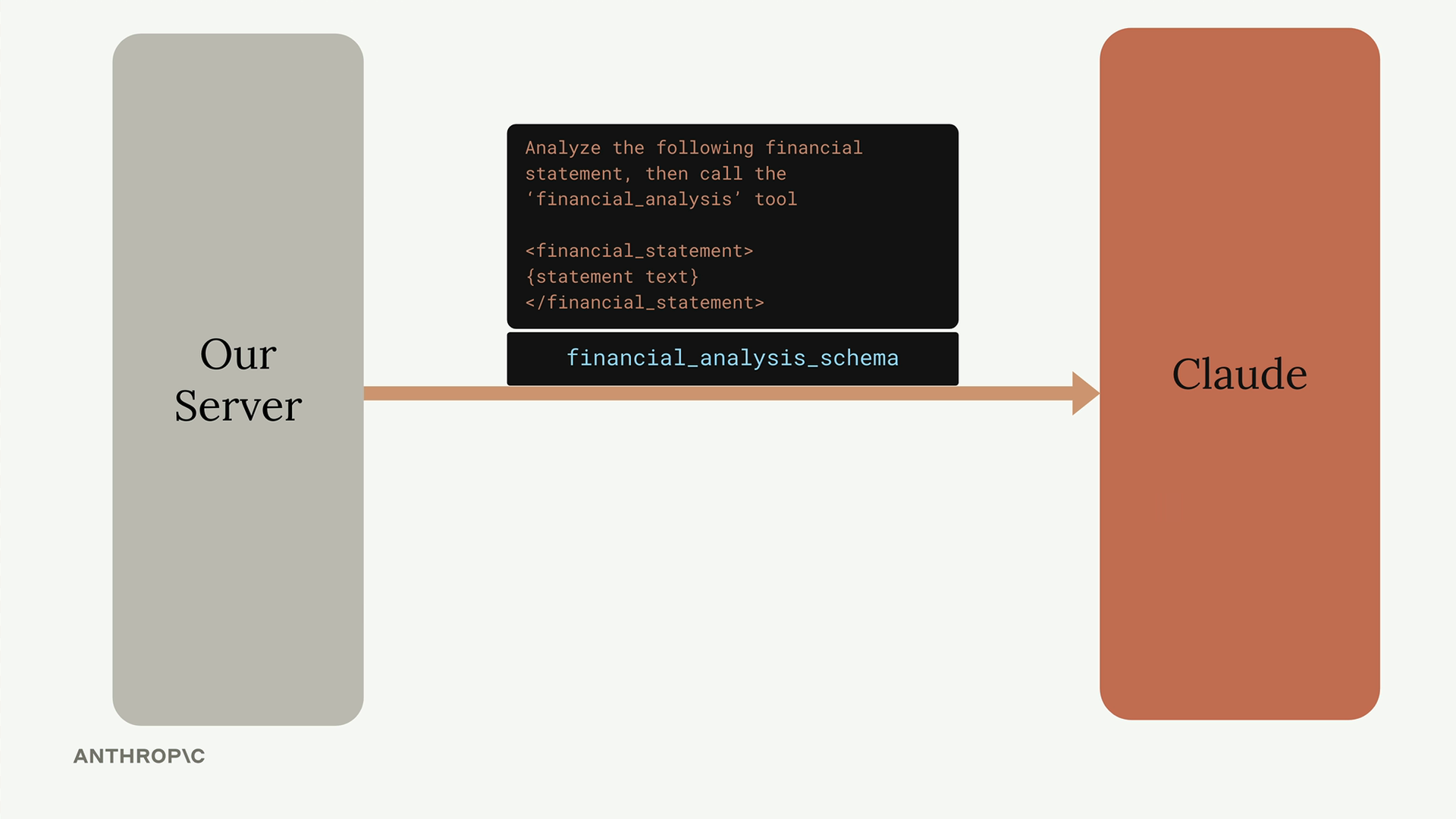
The flow looks like this: your server sends a prompt asking Claude to analyze data and call a specific tool. Claude responds with a tool use message containing the extracted JSON data. At that point, you simply take the data and end the conversation - no follow-up needed.
Controlling Tool Usage
When using tools for structured output, you want to guarantee that Claude uses your extraction tool. The toolChoice parameter gives you three options:
{"toolChoice": {"auto": {}}}- Model decides if it needs to use a tool (default){"toolChoice": {"any": {}}}- Model must use a tool, but can choose which one{"toolChoice": {"tool": {"name": "tool-name"}}}- Model must use the specified tool
For structured output, you'll almost always want the third option to ensure Claude uses your extraction tool.
Practical Example
Let's say you want to extract the title, author, and key topics from an article. First, you'd create a tool schema:
article_details_schema = {
    "toolSpec": {
        "name": "article_details",
        "description": "Extracts key information from an article",
        "inputSchema": {
            "json": {
                "type": "object",
                "properties": {
                    "title": {
                        "type": "string",
                        "description": "The title of the article"
                    },
                    "author": {
                        "type": "string",
                        "description": "The author's name"
                    },
                    "topics": {
                        "type": "array",
                        "items": {"type": "string"},
                        "description": "List of key topics mentioned"
                    }
                },
                "required": ["title", "author", "topics"]
            }
        }
    }
}
Then you'd call Claude with your data and force it to use the tool:
messages = []
add_user_message(messages, f"""
Analyze the article below and extract key data. Then call the article_details tool.

<article_text>
{article_text}
</article_text>
""")

result = chat(messages, tools=[article_details_schema], tool_choice="article_details")
Claude will respond with a tool use message containing the extracted data in the exact format you specified. The tool call arguments will contain your structured JSON data, ready to use in your application.
Key Benefits
- More reliable than prompt-based extraction
- Guaranteed structure matching your schema
- No need for message pre-fills or stop sequences
- Built-in validation through the tool schema
The main tradeoff is complexity - you need to write detailed schemas and handle tool responses. But when you need consistent, reliable structured output, tools are the way to go.
Downloads
🔁 Related lessons
- Next: Flexible tool extraction
- Previous: Batch tool use
- Same section: Overview of Claude Models · Accessing the API · Making a request
- Part of paths: Path C
- Reference docs: Glossary · Skills atlas · By use-case
📚 Source & attribution
- Original Anthropic Academy lesson: https://anthropic.skilljar.com/claude-in-amazon-bedrock/276765
- © 2025 Anthropic. Educational fair-use only.