📖 Lesson content
Summary
Claude can natively run multiple tools at the same time, but some versions don't take advantage of this as much as you might wish. You can greatly increase the chances of Claude making multiple tool calls in a single message by implementing a batch tool.
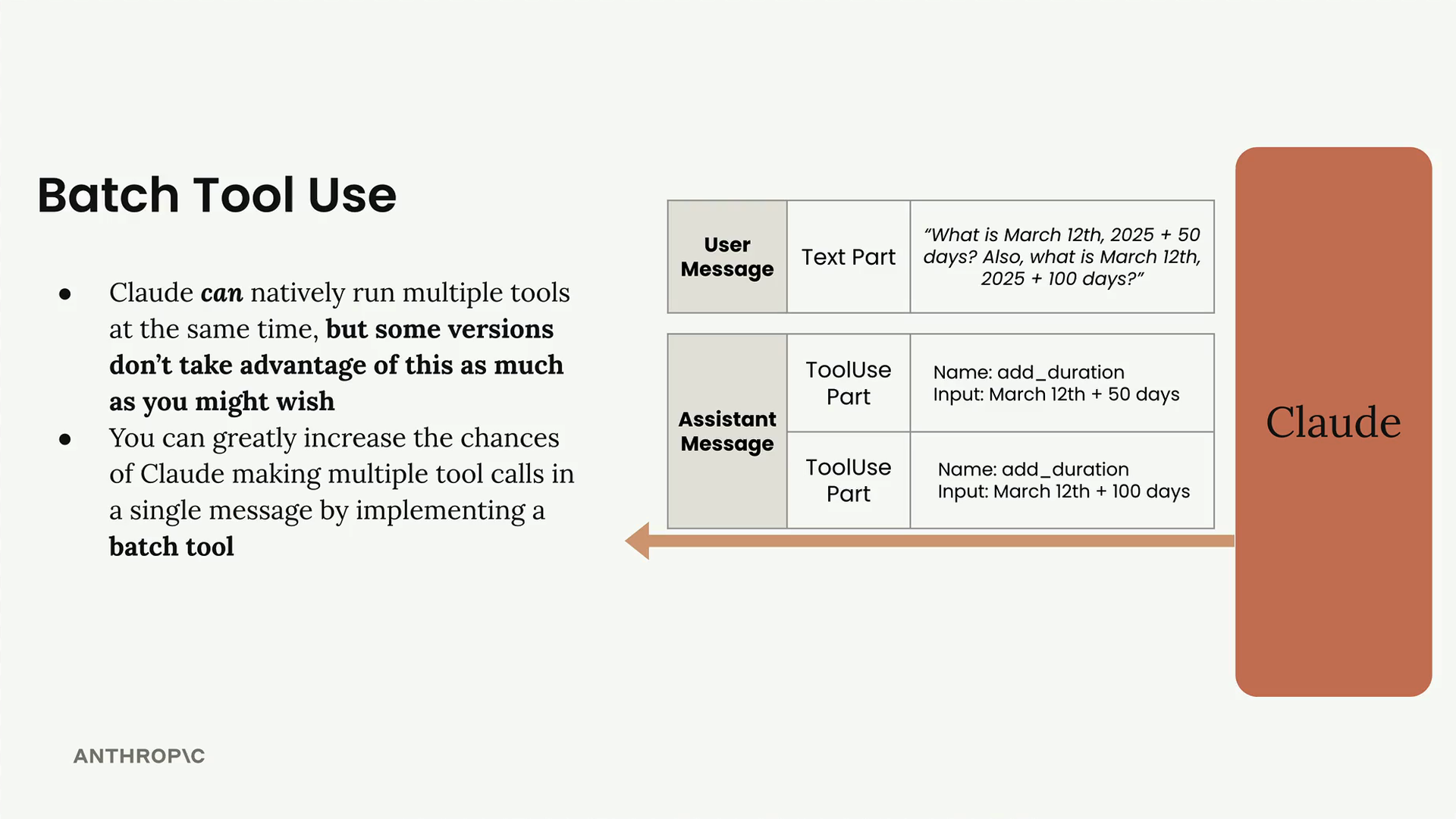
When Claude sends back tool use parts in a message, there can be more than one tool request in a single response. For example, if you ask "What is March 12th, 2025 + 50 days? Also, what is March 12th, 2025 + 100 days?", Claude could theoretically send back two separate tool use parts - one for each calculation. These operations are completely parallelizable since they don't depend on each other.
However, Claude doesn't always try to parallelize tool calls as much as you'd expect. Instead of making both calls simultaneously, it often makes them sequentially, which is less efficient.
How the Batch Tool Works
The batch tool is implemented just like any other tool - you need a tool specification and a function to handle when it gets called. The key idea is to create a tool that can invoke multiple other tools simultaneously.
Here's the basic structure of the batch tool specification:
{
  "name": "batch_tool",
  "description": "Invoke multiple other tool calls simultaneously",
  "input_schema": {
    "type": "object",
    "properties": {
      "invocations": {
        "type": "array",
        "description": "The tool calls to invoke",
        "items": {
          "type": "object",
          "properties": {
            "name": {
              "type": "string",
              "description": "The name of the tool to invoke"
            },
            "arguments": {
              "type": "string",
              "description": "The arguments to the tool, encoded as a JSON string"
            }
          },
          "required": ["name", "arguments"]
        }
      }
    },
    "required": ["invocations"]
  }
}
The tool takes a list of invocations, where each invocation contains the name of a tool to call and its arguments (encoded as a JSON string).
Implementation
The batch tool implementation involves two main functions:
The run_batch Function
def run_batch(tool_input):
    batch_output = []
    for invocation in tool_input["invocations"]:
        tool_name = invocation["name"]
        args = json.loads(invocation["arguments"])

        tool_output = run_tool(tool_name, args)
        batch_output.append({"tool_name": tool_name, "output": tool_output})

    return batch_output
This function loops through each invocation, extracts the tool name and arguments, calls the appropriate tool using the existing run_tool function, and collects all the results.
Adding to run_tool
You also need to add a case to your main run_tool function:
elif tool_name == "batch_tool":
    return run_batch(tool_input)
Note that unlike other tools, you pass tool_input directly without using the splat operator (**), since the batch tool needs to handle the raw input structure.
Results
When you implement the batch tool and run the same date calculation query, instead of seeing two separate tool calls in the message log, you'll see a single call to the batch tool. This single call contains both date calculations as sub-invocations, effectively parallelizing the operations.
The batch tool is particularly useful when you have multiple independent operations that can be executed simultaneously. By "tricking" Claude into using this pattern, you can significantly improve the efficiency of your tool-calling workflows.
🔁 Related lessons
- Next: Structured data with tools
- Previous: Adding multiple tools
- Same section: Overview of Claude Models · Accessing the API · Making a request
- Part of paths: Path C
- Reference docs: Glossary · Skills atlas · By use-case
📚 Source & attribution
- Original Anthropic Academy lesson: https://anthropic.skilljar.com/claude-in-amazon-bedrock/276766
- © 2025 Anthropic. Educational fair-use only.