📖 Lesson content
Summary
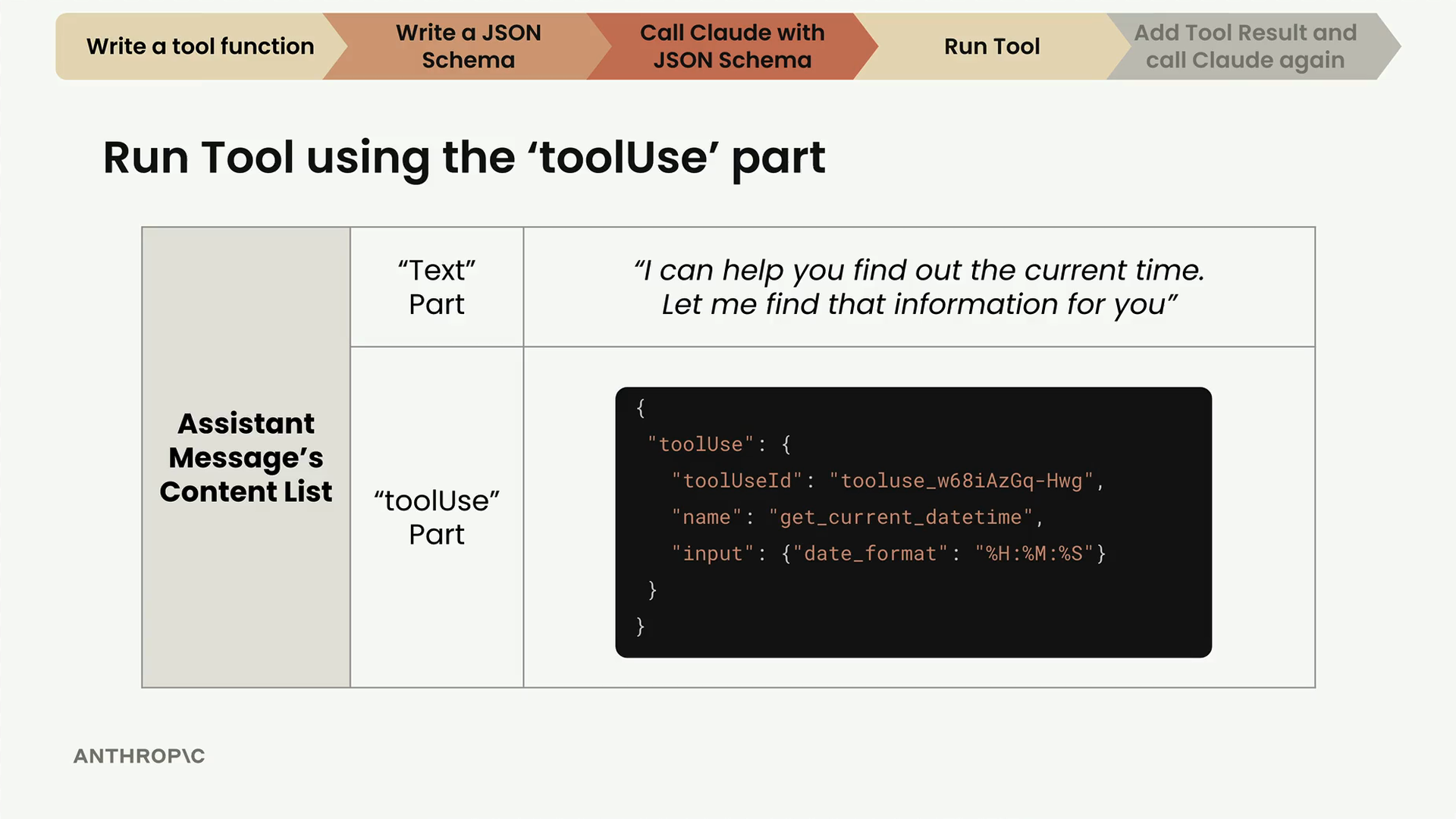
When Claude responds with a tool use request, your server needs to actually run the requested tool and send the results back. This step involves extracting tool use parts from Claude's response, executing the appropriate functions, and formatting the results properly.
Handling Multiple Tool Requests
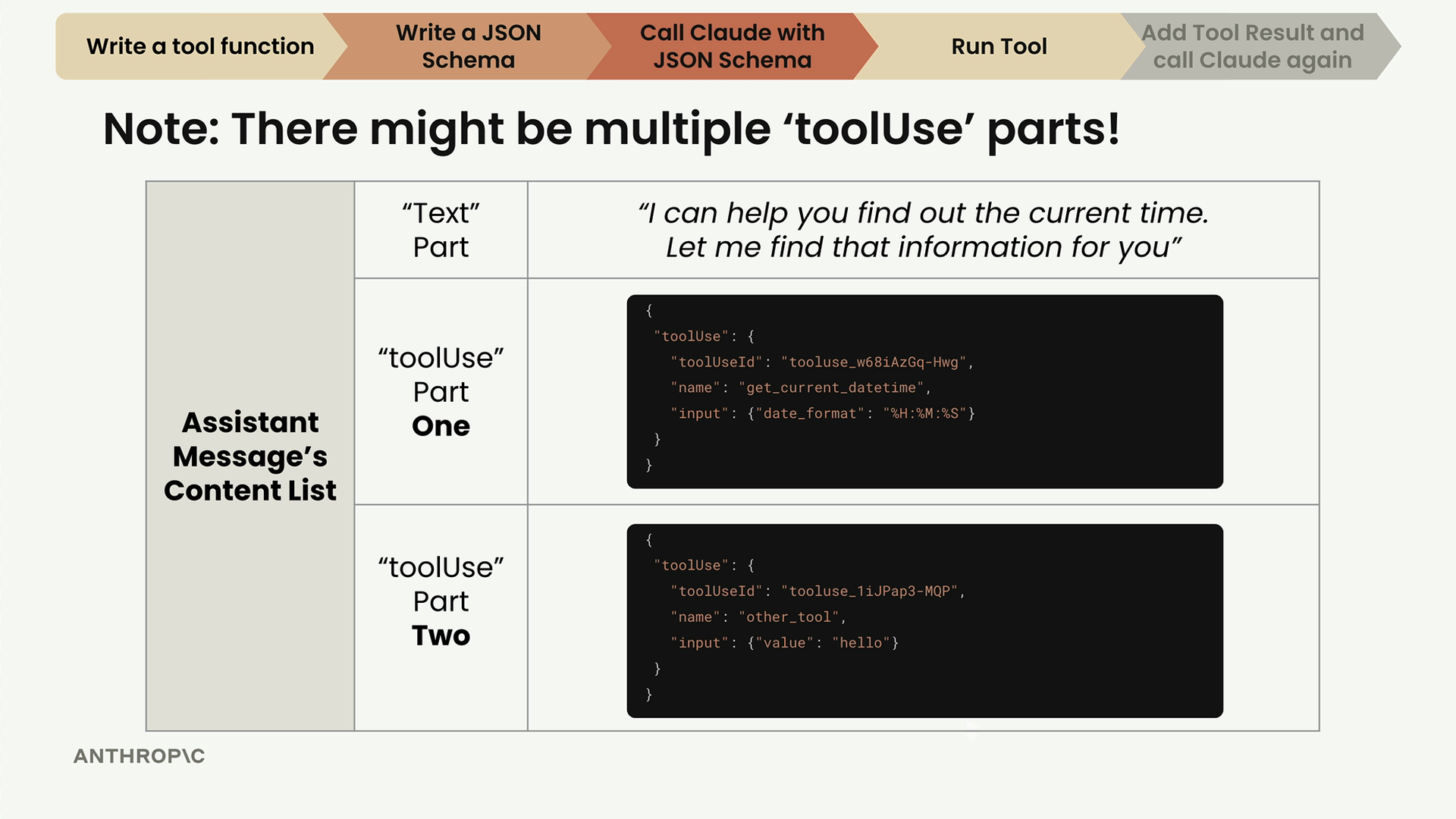
Claude can send multiple tool use parts in a single response. Your code needs to handle this possibility defensively. An assistant message might contain a text part followed by one, two, or even more tool use parts.
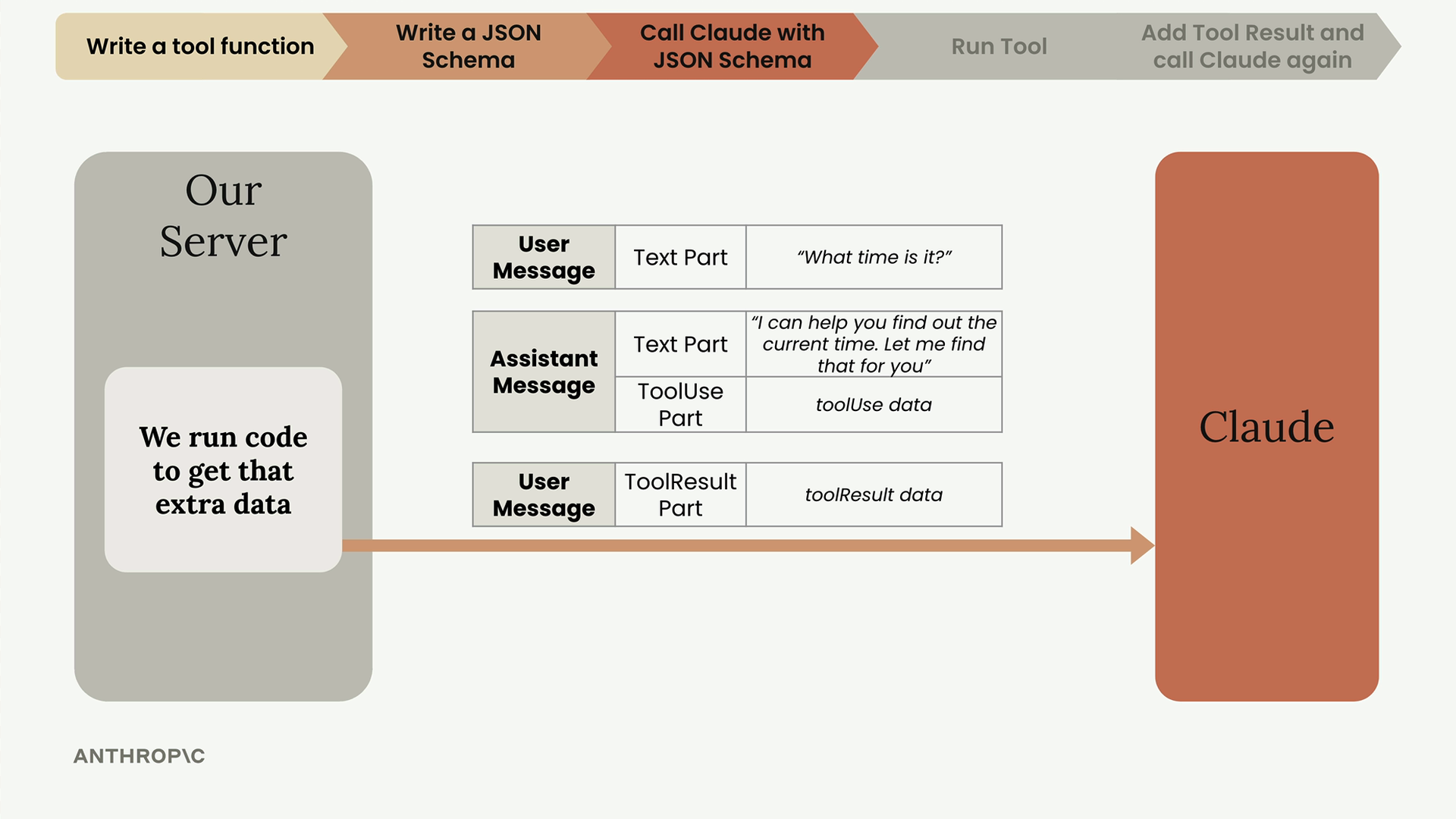
The flow works like this: Claude sends a request with JSON schema, receives a tool use part, then your server runs the tool and sends back a tool result part for Claude to provide a final response.
Extracting Tool Use Parts
First, create a function to process all the parts returned from a chat request:
def run_tools(parts):
    tool_requests = [part for part in parts if "toolUse" in part]
    tool_result_parts = []

    for tool_request in tool_requests:
        tool_use_id = tool_request["toolUse"]["toolUseId"]
        tool_name = tool_request["toolUse"]["name"]
        tool_input = tool_request["toolUse"]["input"]
This comprehension filters the parts list to only include dictionaries that contain a "toolUse" key, ignoring text parts.
Running the Actual Tools
Create a helper function to execute the requested tool:
def run_tool(tool_name, tool_input):
    if tool_name == "get_current_datetime":
        return get_current_datetime(**tool_input)
    else:
        raise Exception(f"Unknown tool name: {tool_name}")
The key detail here is using **tool_input to splat the dictionary of arguments into your tool function. Claude always returns arguments as a dictionary object, so you need to unpack it properly.
Creating Tool Result Parts
After running a tool, you need to format the response as a tool result part:
Tool result parts require three key properties:
- toolUseId - Must match the original tool use part's ID
- content - The output from your tool, serialized as a string
- status - Either "success" or "error"
Understanding Tool Use IDs
The tool use ID system becomes important when Claude requests multiple tools in parallel. For example, if Claude wants to run a calculator tool twice:
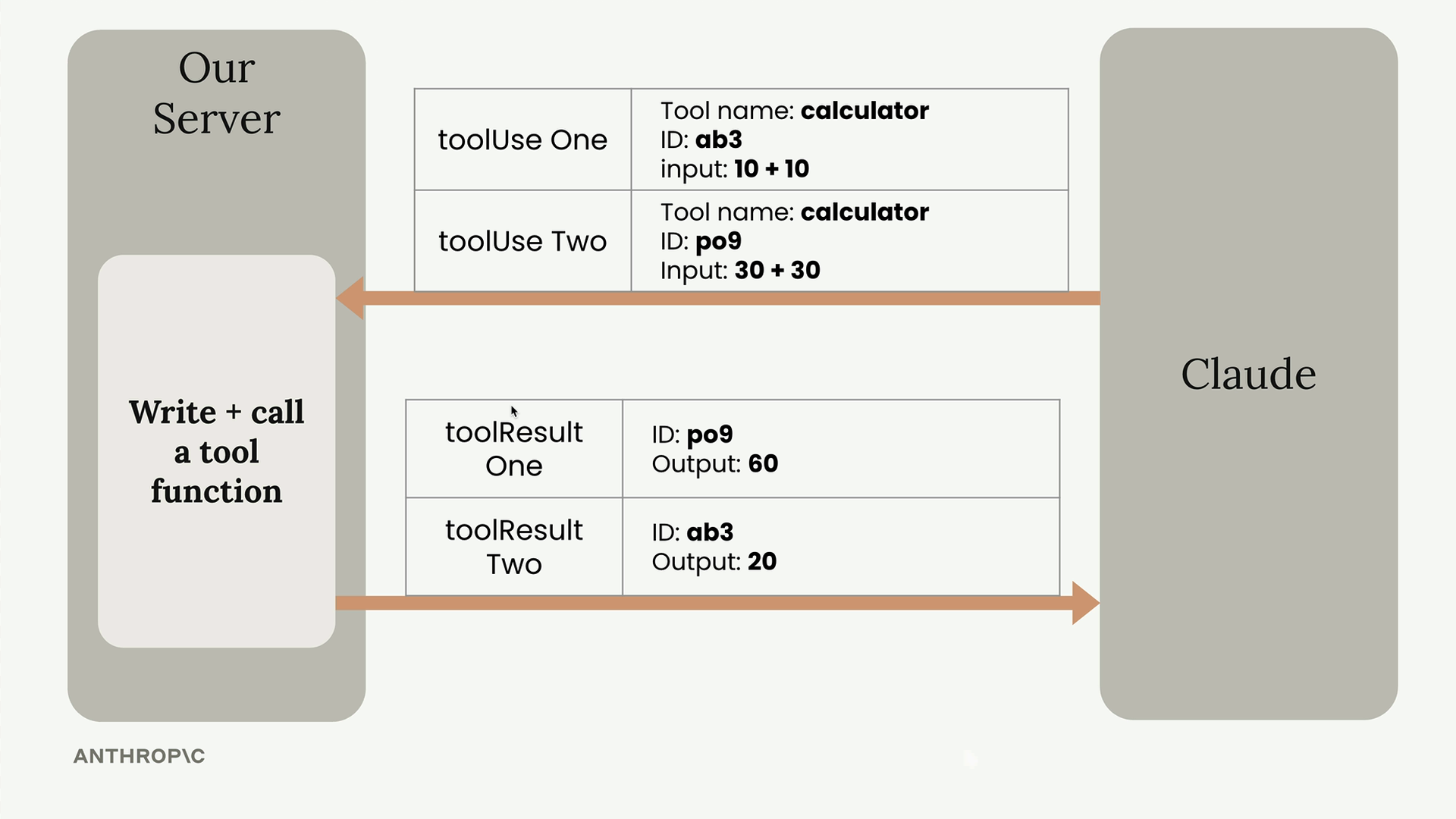
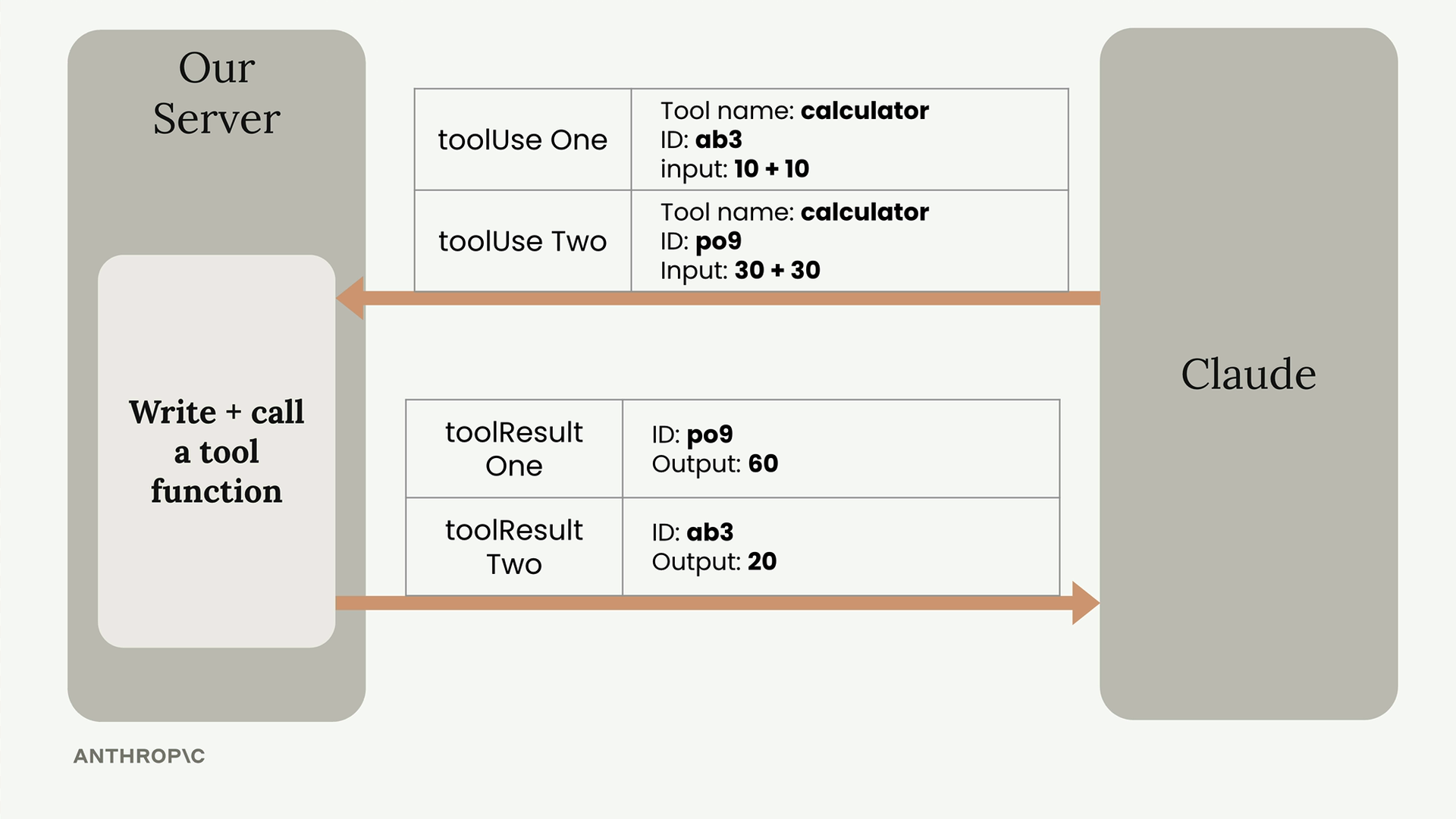
Each tool use gets a unique ID (like "ab3" and "po9"), and your tool results must include the matching IDs so Claude knows which result corresponds to which request.
Error Handling
Wrap your tool execution in try-catch blocks. Claude is intelligent about tool errors and might adjust its approach if you return proper error information:
try:
    tool_output = run_tool(tool_name, tool_input)
    tool_result_part = {
        "toolResult": {
            "toolUseId": tool_use_id,
            "content": [{"text": json.dumps(tool_output)}],
            "status": "success"
        }
    }
except Exception as e:
    tool_result_part = {
        "toolResult": {
            "toolUseId": tool_use_id,
            "content": [{"text": f"Error: {e}"}],
            "status": "error"
        }
    }
Complete Implementation
Here's the full function that processes tool requests and returns formatted results:
def run_tools(parts):
    tool_requests = [part for part in parts if "toolUse" in part]
    tool_result_parts = []

    for tool_request in tool_requests:
        tool_use_id = tool_request["toolUse"]["toolUseId"]
        tool_name = tool_request["toolUse"]["name"]
        tool_input = tool_request["toolUse"]["input"]

        try:
            tool_output = run_tool(tool_name, tool_input)
            tool_result_part = {
                "toolResult": {
                    "toolUseId": tool_use_id,
                    "content": [{"text": json.dumps(tool_output)}],
                    "status": "success"
                }
            }
        except Exception as e:
            tool_result_part = {
                "toolResult": {
                    "toolUseId": tool_use_id,
                    "content": [{"text": f"Error: {e}"}],
                    "status": "error"
                }
            }

        tool_result_parts.append(tool_result_part)

    return tool_result_parts
Once you have the tool result parts, you can send them back to Claude in your next chat request, completing the tool use cycle.
🔁 Related lessons
- Next: Sending tool results
- Previous: Handling tool use responses
- Same section: Overview of Claude Models · Accessing the API · Making a request
- Part of paths: Path C
- Reference docs: Glossary · Skills atlas · By use-case
📚 Source & attribution
- Original Anthropic Academy lesson: https://anthropic.skilljar.com/claude-in-amazon-bedrock/276762
- © 2025 Anthropic. Educational fair-use only.