📖 Lesson content
Summary
Building a custom prompt evaluation workflow starts with creating a clear goal and generating test data. In this case, we're building a prompt that helps users write AWS-specific code - either Python functions, JSON configurations, or regular expressions - with no extra explanations or formatting.
Setting Up the Goal
The prompt should take a user's task description and return one of three output types:
- Python code
- JSON configuration
- Regular expressions
The key requirement is that responses should contain only the requested code without headers, footers, or explanations.
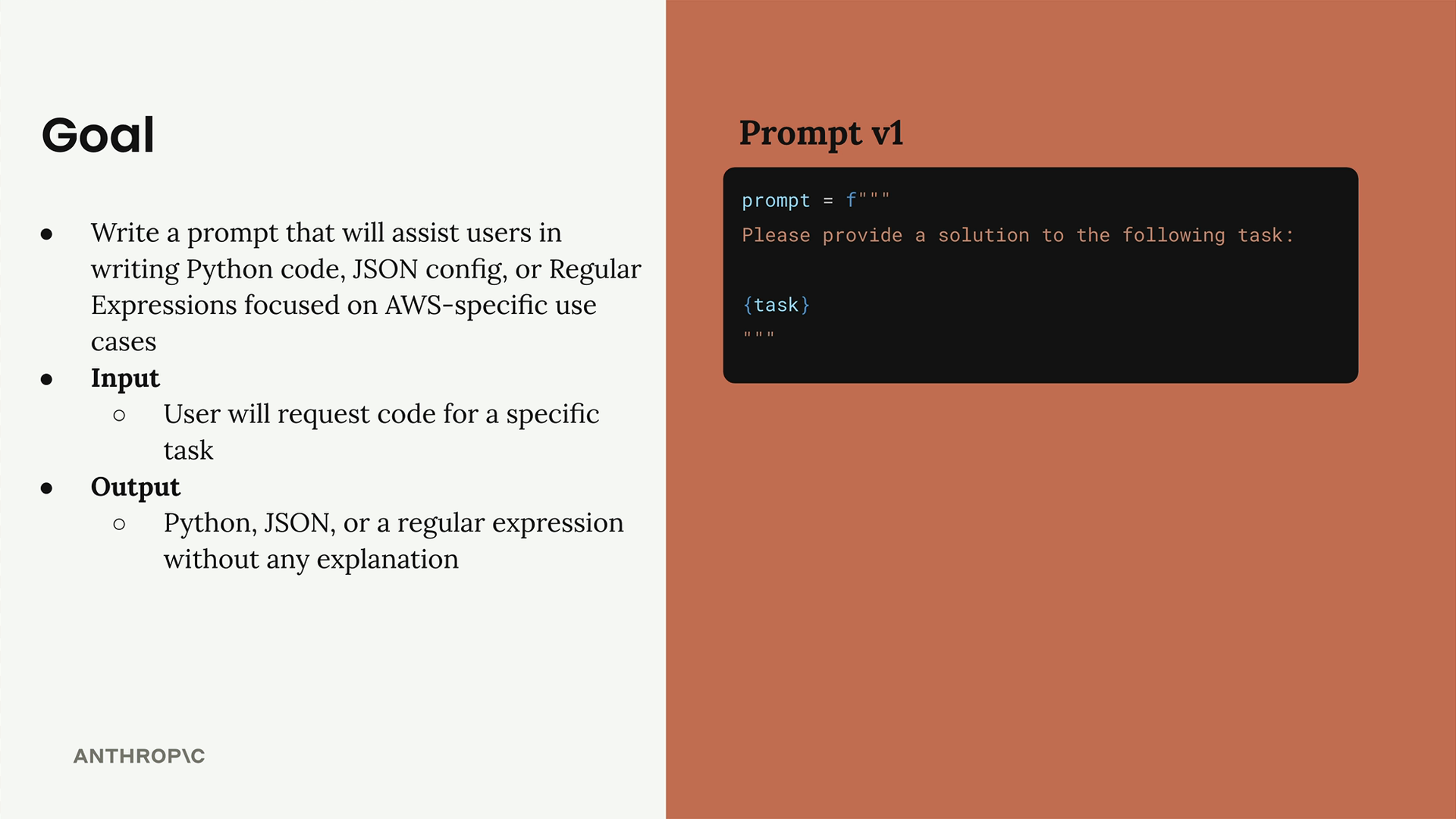
Starting with a simple first version keeps things manageable. The initial prompt template is straightforward: "Please provide a solution to the following task: {task}"
Creating Evaluation Datasets
An evaluation dataset contains input examples that you'll feed into your prompt. Each test case gets combined with your prompt and sent to Claude, letting you see how well the prompt performs across different scenarios.
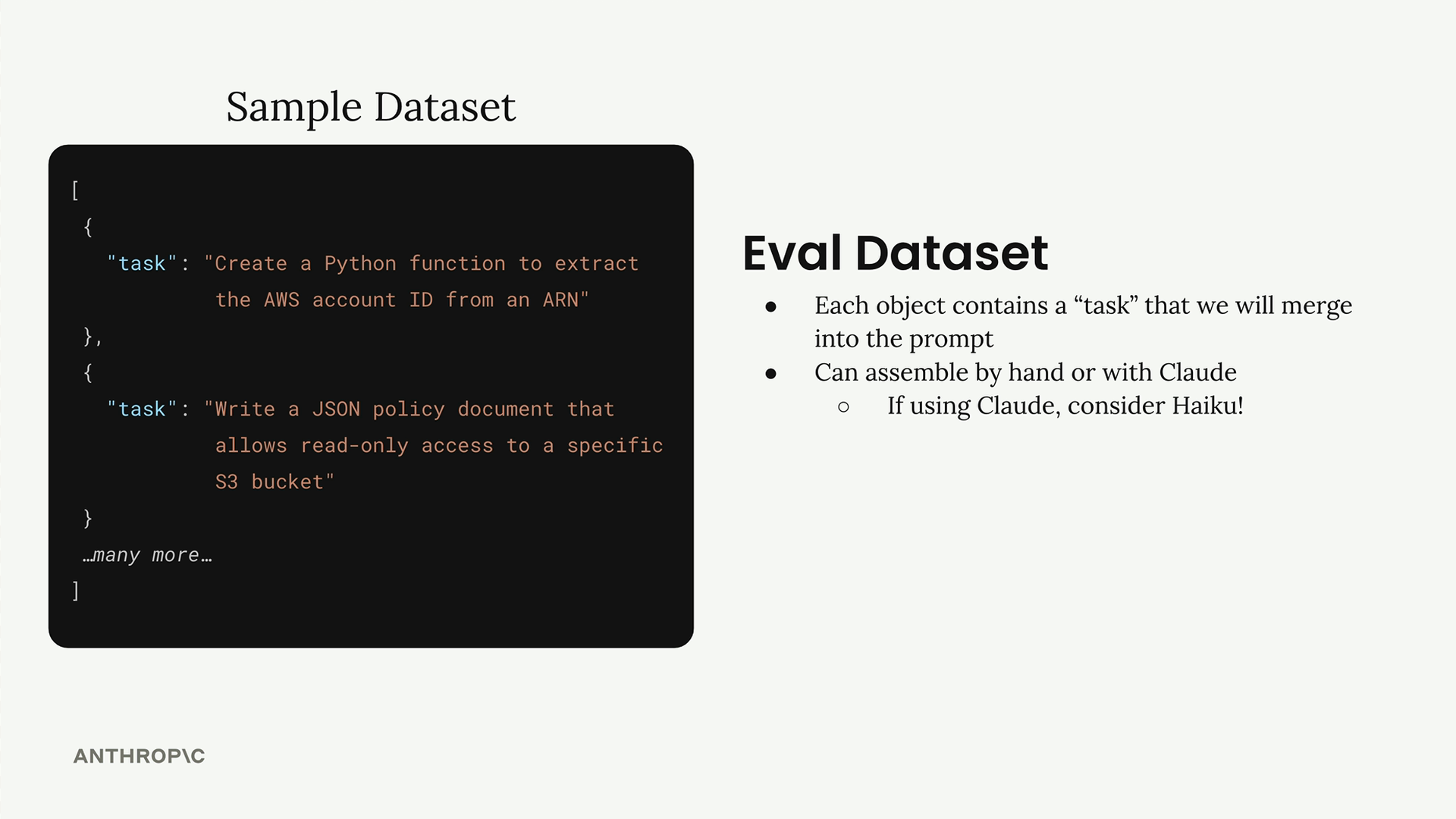
You can create datasets in two ways:
- Manually write test cases by hand
- Generate them automatically using Claude
For automatic generation, using a faster model like Haiku makes sense since you're generating multiple test cases.
Generating Test Data with Code
The dataset generation function uses Claude to create realistic test scenarios. Here's the basic structure:
def generate_dataset():
    prompt = """
    Generate 3 AWS-related tasks that require Python, JSON, or Regex solutions.

    Focus on tasks that can be solved by writing a single Python function,
    a single JSON object, or tasks that do not require writing much code.

    Example output:
    [
        {
            "task": "Description of task"
        },
        ...additional
    ]

    Please generate 3 objects.
    """

    messages = []
    add_user_message(messages, prompt)
    add_assistant_message(messages, "```json")
    text = chat(messages, stop_sequences=["```"])
    return json.loads(text)
This approach uses the pre-filled assistant message technique with stop sequences to extract clean JSON responses. The assistant message starts with "```json" and stops at the closing "```", ensuring you get properly formatted data. ## Saving Your Dataset Once generated, save the dataset to avoid regenerating it constantly: ``` dataset = generate_dataset() with open("dataset.json", "w") as f: json.dump(dataset, f, indent=2) ``` ` The generated dataset creates realistic AWS tasks like extracting account IDs from ARNs, writing JSON schemas for EC2 configurations, and creating regex patterns for S3 bucket names. While three test cases work for initial development, production evaluation would need significantly more examples with greater variety. This foundation gives you a repeatable process for creating evaluation datasets that match your specific use case, setting up the next steps of running evaluations and measuring prompt performance. `
` #### Downloads - [dataset.json](https://cc.sj-cdn.net/instructor/4hdejjwplbrm-anthropic-poc/assets/1745959825/dataset.json?response-content-disposition=attachment&Expires=1776934823&Signature=TgYkaCC5cYjkulRF~BJRuc81cRJmsoxxw7VNB2TrbzWIbR2vdcIUwBt0ZWN2bbltto-RSlu0U7ysA6txcs~bzYLN1dXp3yXJuygjPMfh-BSvA24V9IiaskCj7nccCW9NIQ4FmJq8XsnO9ZhaXpgFZNBDFIvErCOOejgyLJMYF9rcuRtYuROr8xBVfUhTYb-5pWuLbE5V1E9C7affNHAqzJTyz1E3H~AFmvNGp0xUtf55N7TXO9YMZ57tbeEGKGsYlhdYpbJYlaiDuz5GQeGmj~FSLsddlcIz8sC9TUU03ePhb0mu9QqQZKZA4XNFoKES2kInYUvUwpfGP8nKhV408w__&Key-Pair-Id=APKAI3B7HFD2VYJQK4MQ) - [001_Prompt_Evals.ipynb](https://cc.sj-cdn.net/instructor/4hdejjwplbrm-anthropic-poc/assets/1745959825/001_Prompt_Evals.ipynb?response-content-disposition=attachment&Expires=1776934823&Signature=MmYQ744qdva5c6qlTY2L1gRjmRC98AfQlZg45TnwaimtckXGmRfO5b5vGL~P7ULH9R1HPLS94Fy1UwQg3t6rHzirEjBfE-daLZky2v44d0IeOc2-EyzaRwzKUAtUGTmqGtt9H8ARkZSA0skkgWe2fI7ZpQ58IVoFoWNatBr46wuG5opVqWHl3q6NQzDr9ldc0jOgOlYcMwbuVZZ5a5fQLhOWGa4~aLSrRj9agWQdb9MTFsZgrZBuJM7AWm3vrG~Pk0V62uDzUHefAyD44UkbTdaHjcGANput0Q1w2BzIeJfIG1c3h0y0j-h2VlyKzwDfPXYs2zwebVR~HaHASuXlRQ__&Key-Pair-Id=APKAI3B7HFD2VYJQK4MQ) - [001_Prompt_Evals_complete.ipynb](https://cc.sj-cdn.net/instructor/4hdejjwplbrm-anthropic-poc/assets/1745959825/001_Prompt_Evals_complete.ipynb?response-content-disposition=attachment&Expires=1776934823&Signature=t6qBAxWm698RN9BYlpCjZFTl7YSsOoVib7ja4Gfak1GR7m4vM0DEoUdWIiEnaJR-l7w5i7j1mLAKtR~OR~LGxoEAvLjsAqEovEkSKe9I76BvLKNpi0K0wEJI~iW7xS~V9VVD7tCHzfS8Fij7JpbXT-ZaNY1eNHQ9NHeSP8ojxTuVWySEg9pK7V6VYfDaOCQYuwBPiCl980IWsDgMlq7Wi9Mvsej8R2AS3KW5yjxgJFQiEpTf7qh2UEmT1bj3WFc657UINORPF3coiWlg02~2l6NLm3HIaYPRx5RQeUD3HtCQQCuyPdO0AmV3PVDc01EXwhYvoDb5rb5v4lJ3roc-IQ__&Key-Pair-Id=APKAI3B7HFD2VYJQK4MQ) `
🔁 Related lessons
- Next: Running the eval
- Previous: A typical eval workflow
- Same section: Overview of Claude Models · Accessing the API · Making a request
- Part of paths: Path C
- Reference docs: Glossary · Skills atlas · By use-case
📚 Source & attribution
- Original Anthropic Academy lesson: https://anthropic.skilljar.com/claude-in-amazon-bedrock/276733
- © 2025 Anthropic. Educational fair-use only.