📖 Lesson content
Summary
Resources in MCP allow your server to expose data that can be directly included in prompts, rather than requiring tool calls to access information. This creates a more efficient way to provide context to AI models like Claude.
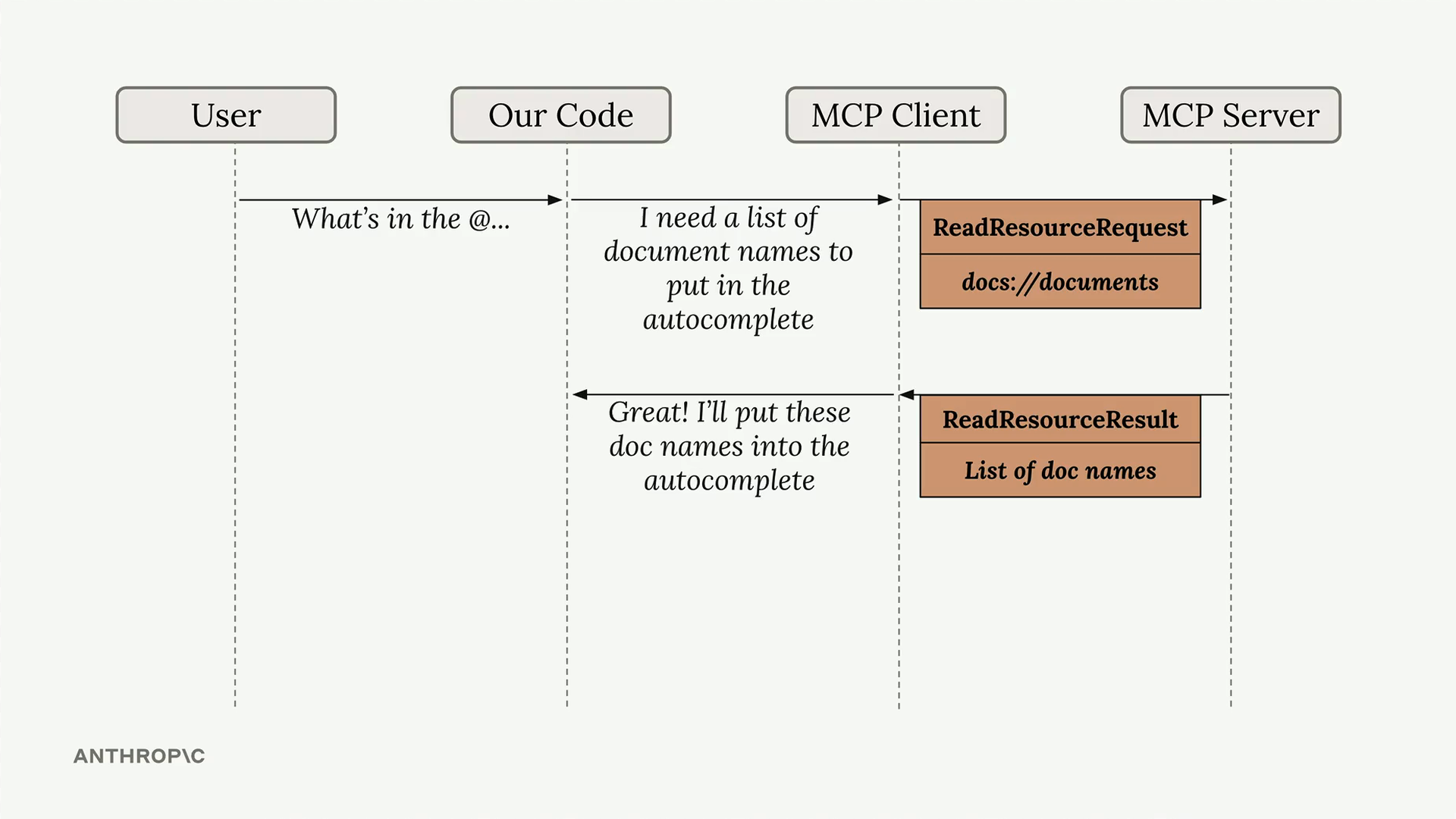
Understanding the Resource Flow
When a user types something like "What's in the @..." in your application, the system needs to fetch a list of available resources for autocomplete. The MCP client sends a ReadResourceRequest to the server, which responds with a list of document names that can be referenced.
Implementing Resource Reading
The core functionality happens in the read_resource method of your MCP client. This method takes a URI parameter that identifies which resource to fetch from the server.
First, add the necessary imports to handle JSON parsing and URL validation:
import json
from pydantic import AnyUrl
The main implementation makes a request to the MCP server and processes the response:
async def read_resource(self, uri: str) -> Any:
    result = await self.session().read_resource(AnyUrl(uri))
    resource = result.contents[0]
Handling Different Content Types
Resources can return different types of content, so you need to check the MIME type to handle the response appropriately:
if isinstance(resource, types.TextResourceContents):
    if resource.mimeType == "application/json":
        return json.loads(resource.text)

return resource.text
This approach ensures that JSON resources are properly parsed, while plain text resources are returned as-is.
Testing the Implementation
Once implemented, you can test the resource functionality by running your CLI application. When you type "@" followed by a resource name, the system will:
- Show available resources in an autocomplete list
- Allow you to select a resource using arrow keys and space
- Include the resource content directly in the prompt sent to Claude
This means Claude receives the document content immediately without needing to make additional tool calls, making the interaction much more efficient.
Key Benefits
Resources provide several advantages over tools for accessing static information:
- Content is included directly in prompts, reducing latency
- No additional API calls needed during conversation
- Better user experience with autocomplete functionality
- Cleaner separation between static data and dynamic operations
Resources work best for relatively static information that you want to make easily accessible to AI models, such as documentation, reports, or reference materials.
🔁 Related lessons
- Next: Defining prompts
- Previous: Defining resources
- Same section: Overview of Claude Models · Accessing the API · Making a request
- Part of paths: Path C
- Reference docs: Glossary · Skills atlas · By use-case
📚 Source & attribution
- Original Anthropic Academy lesson: https://anthropic.skilljar.com/claude-in-amazon-bedrock/276797
- © 2025 Anthropic. Educational fair-use only.