(Show All)_ · **Lesson 1/6** · [🌐 Vietnamese](../../vi/01-what-are-skills/vi.md)
Previous: — · 📋 Course TOC · Next →
What are skills?
👨💻 Track: Developer Track · 📚 Course: Introduction to Agent Skills · ⏱ 15 minutes · 🧭
Path C
📖 Lesson content
What you'll learn
Estimated time: 15 minutes
By the end of this lesson you'll be able to:
- Define what Claude Code skills are and how they work
- Explain where skills live (personal vs. project directories)
- Distinguish between skills, CLAUDE.md, and slash commands
- Identify scenarios where skills are the right customization tool
What are skills?
(3 minutes)
This video introduces skills — reusable markdown files that teach Claude Code how to handle specific tasks automatically. Instead of repeating instructions every time you ask Claude to review a PR or write a commit message, you write a skill once and Claude applies it whenever the task comes up. The video covers what skills are, where they live, and how they compare to other Claude Code customization options.
Key takeaways
- Skills are folders of instructions that Claude Code can discover and use to handle tasks more accurately. Each skill lives in a
SKILL.mdfile with a name and description in its frontmatter - Claude uses the description to match skills to requests. When you ask Claude to do something, it compares your request against available skill descriptions and activates the ones that match
- Personal skills go in
~/.claude/skillsand follow you across all projects. Project skills go in.claude/skillsinside a repository and are shared with anyone who clones it - Skills load on demand — unlike CLAUDE.md (which loads into every conversation) or slash commands (which require explicit invocation), skills activate automatically when Claude recognizes the situation
- If you find yourself explaining the same thing to Claude repeatedly, that's a skill waiting to be written
Every time you explain your team's coding standards to Claude, you're repeating yourself. Every PR review, you re-describe how you want feedback structured. Every commit message, you remind Claude of your preferred format. Skills fix this.
A skill is a markdown file that teaches Claude how to do something once. Claude then applies that knowledge automatically whenever it's relevant.
What Skills Are
Skills are folders of instructions and resources that Claude Code can discover and use to handle tasks more accurately. Each skill lives in a SKILL.md file with a name and description in its frontmatter.
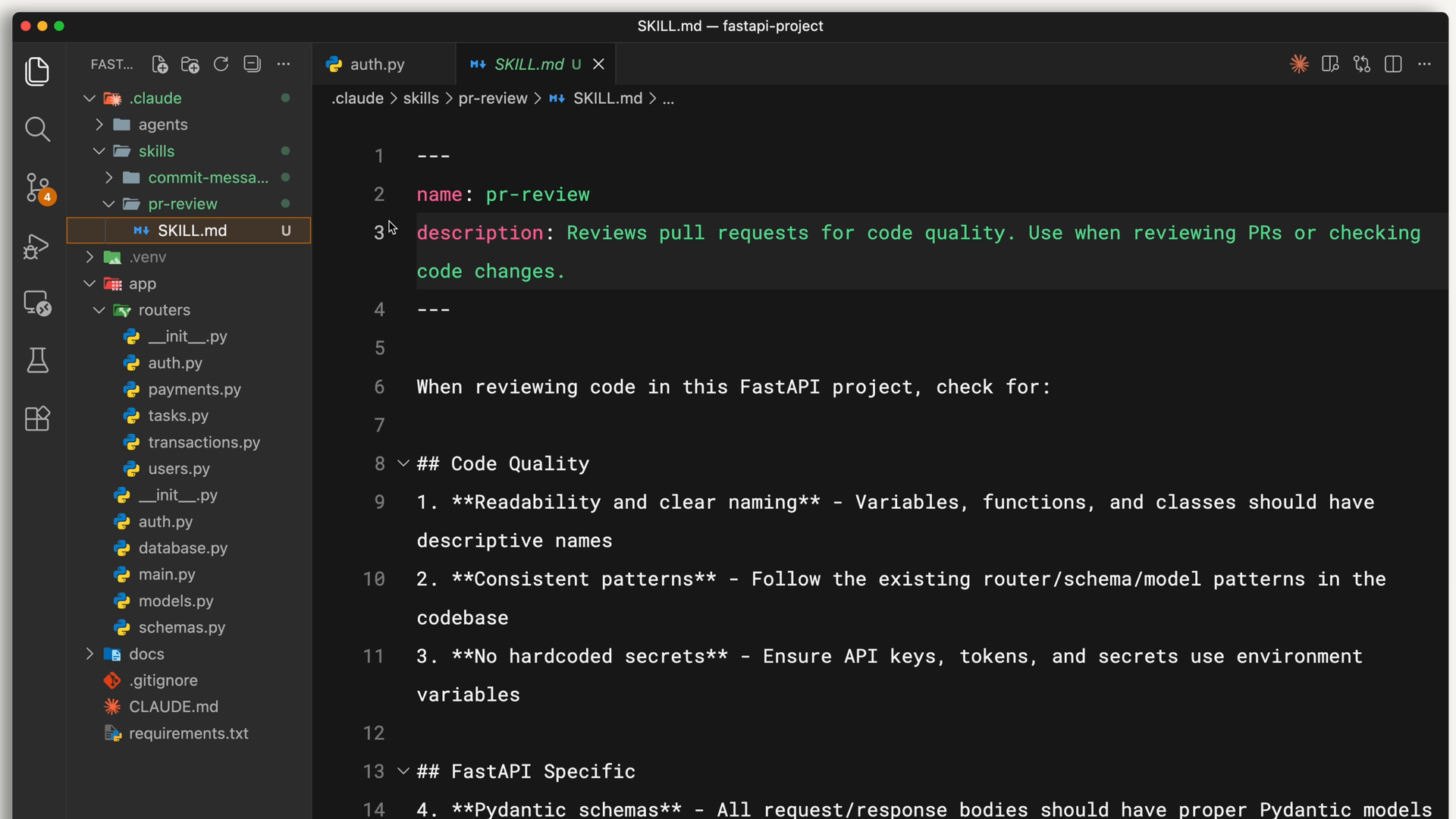
The description is how Claude decides whether to use the skill. When you ask Claude to review a PR, it matches your request against available skill descriptions and finds the relevant one. Claude reads your request, compares it to all available skill descriptions, and activates the ones that match.
Here's what a skill's frontmatter looks like:
---
name: pr-review
description: Reviews pull requests for code quality. Use when reviewing PRs or checking code changes.
---
Below the frontmatter, you write the actual instructions — your review checklist, formatting preferences, or whatever Claude needs to know for that task.
Where Skills Live
You can store skills in different places depending on who needs them:
- Personal skills go in
~/.claude/skills(your home directory). These follow you across all your projects — your commit message style, your documentation format, how you like code explained. - Project skills go in
.claude/skillsinside the root directory of your repository. Anyone who clones the repo gets these skills automatically. This is where team standards live, like your company's brand guidelines, preferred fonts, and colors for web design.
On Windows, personal skills live in C:/Users/<your-user>/.claude/skills.
Project skills get committed to version control alongside your code, so the whole team shares them.
Skills vs. CLAUDE.md vs. Slash Commands
Claude Code has several ways to customize behavior. Skills are unique because they're automatic and task-specific. Here's how they compare:
- CLAUDE.md files load into every conversation. If you want Claude to always use TypeScript's strict mode, that goes in CLAUDE.md.
- Skills load on demand when they match your request. Claude only loads the name and description initially, so they don't fill up your entire context window. Your PR review checklist doesn't need to be in context when you're debugging — it loads when you actually ask for a review.
- Slash commands require you to explicitly type them. Skills don't. Claude applies them when it recognizes the situation.
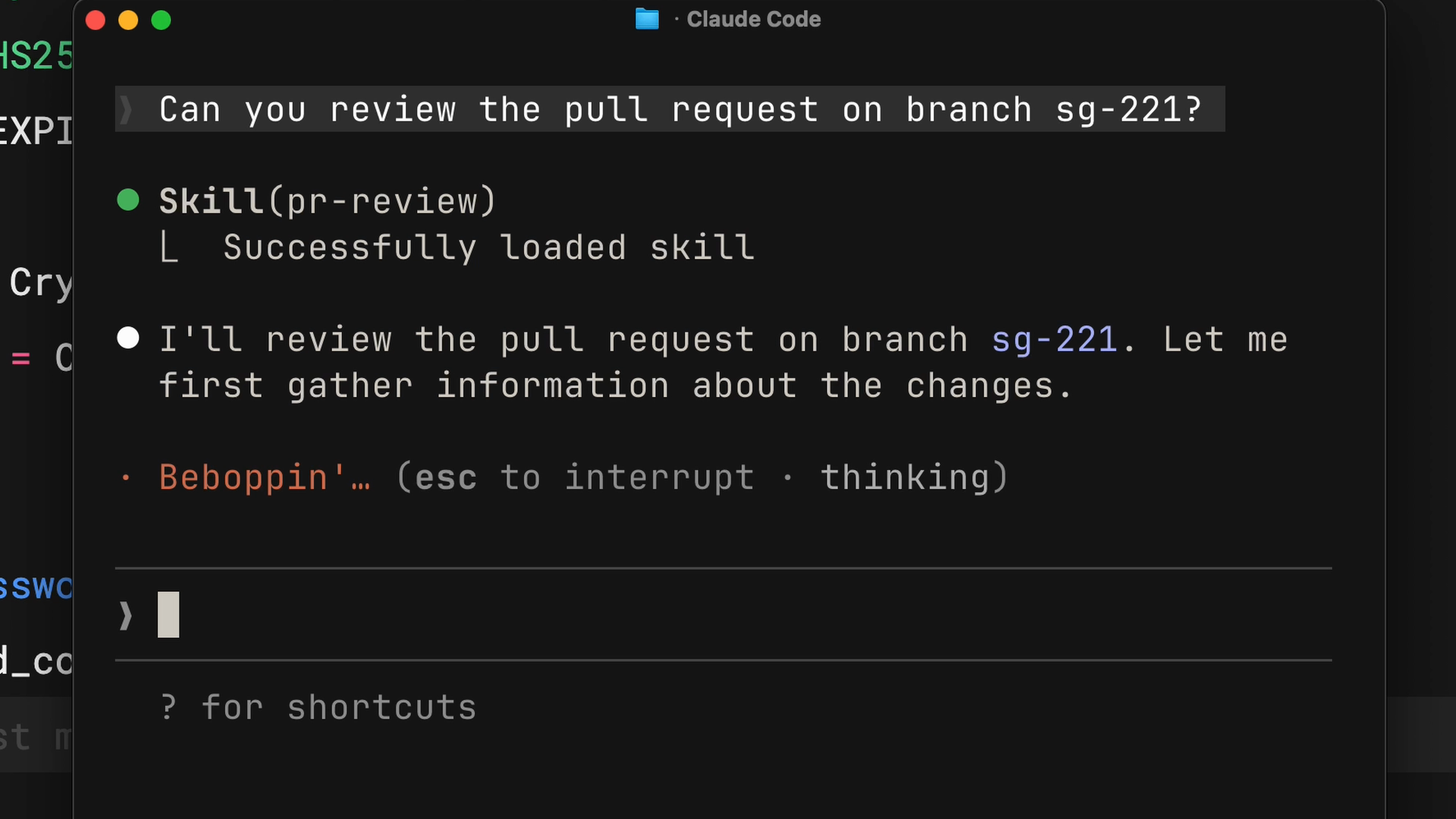
When Claude matches a skill to your request, you'll see it load in the terminal:
When to Use Skills
Skills work best for specialized knowledge that applies to specific tasks:
- Code review standards your team follows
- Commit message formats you prefer
- Brand guidelines for your organization
- Documentation templates for specific types of docs
- Debugging checklists for particular frameworks
The rule of thumb is simple: if you find yourself explaining the same thing to Claude repeatedly, that's a skill waiting to be written.
Lesson reflection
- Think about your most recent interactions with Claude Code. Which instructions did you find yourself repeating? How might a skill have saved you time?
- Consider your team's workflow. Which standards or processes would benefit most from being encoded as skills?
What's next
In the next lesson, you'll create your first skill from scratch and learn how Claude Code discovers, matches, and loads skills behind the scenes.
Feedback
As you progress through the course, we'd love to hear how you're using skills in your work, plus any feedback you may have. Share your feedback here.
🎬 Video transcript
Source video:
bjdBVZa66oU
📜 Click to expand transcript (cleaned + AI-translated)
Introduction to Claude Skills
Every time you explain your team's coding standards to Claude, you're repeating yourself. Whether it is redescribing how you want PR review feedback structured or reminding Claude of your preferred commit message format, these repetitive tasks can be streamlined.
Skills fix this problem. A skill is a Markdown file that teaches Claude how to do something once, allowing Claude to apply that knowledge automatically whenever it is relevant.
How Skills Work
Agent skills are folders containing instructions, scripts, and resources that Claude can discover and use to perform tasks more accurately and efficiently. In Claude Code, this is implemented via the skill.md file.
The Selection Process
The description within the skill.md file is how Claude decides whether to use a specific skill. When you ask Claude to review a PR, it matches your request against all available skill descriptions and activates the ones that match. This ensures that Claude only pulls in the relevant information for the task at hand.
Storage and Scope
You can store skills in different locations depending on who needs access to them:
Personal Skills
Personal skills are stored in the ~/.claude/skills directory. these follow you across all your projects and are ideal for individual preferences, such as:
- Your specific commit message style.
- Your preferred documentation format.
- How you personally like code to be explained.
Project Skills
Project skills are stored in the .claude/skills directory inside the root of your repository. Anyone who clones the repository gets these skills automatically. This is the ideal place for team standards, such as:
- Company brand guidelines.
- Preferred fonts and color palettes for web design.
- Shared coding conventions.
Skills vs. Other Customization Methods
Claude Code offers several ways to customize behavior, but skills are unique because they are automatic and task-specific.
Claude.md vs. Skills
- claude.md: These files load into every single conversation. If you want Claude to always use TypeScript strict mode, that belongs in your
claude.mdfile. - Skills: These load on demand. Claude only scans the name and description initially, so it doesn't fill up your entire context window. For example, your PR review checklist doesn't need to be in the context while you are debugging; it only loads when you actually ask for a review.
Slash Commands vs. Skills
- Slash Commands: These require you to manually type them to trigger an action.
- Skills: These do not require manual triggering. Claude applies them automatically when it recognizes the situation.
Best Use Cases for Skills
Skills work best for specialized knowledge that applies to specific tasks. If you find yourself explaining the same thing to Claude repeatedly, that is a skill waiting to be written. Common use cases include:
- Code review standards followed by your team.
- Specific commit message formats.
- Organizational brand guidelines.
🔁 Related lessons
- Next: Creating your first skill
- Same section: Creating your first skill · Configuration and multi-file skills · Skills vs. other Claude Code features
- Part of paths: Path C
- Reference docs: Glossary · Skills atlas · By use-case
📚 Source & attribution
- Original Anthropic Academy lesson: https://anthropic.skilljar.com/introduction-to-agent-skills/434525
- © 2025 Anthropic. Educational fair-use only.