📖 Lesson content
Summary
Prompt caching is a powerful optimization feature that makes requests cheaper and faster when you're repeatedly sending the same content to Claude. The initial request writes to the cache, and follow-up requests can read from it. The cache lives for 5 minutes and is extremely useful since many applications send identical tool schemas, system prompts, or message histories repeatedly.
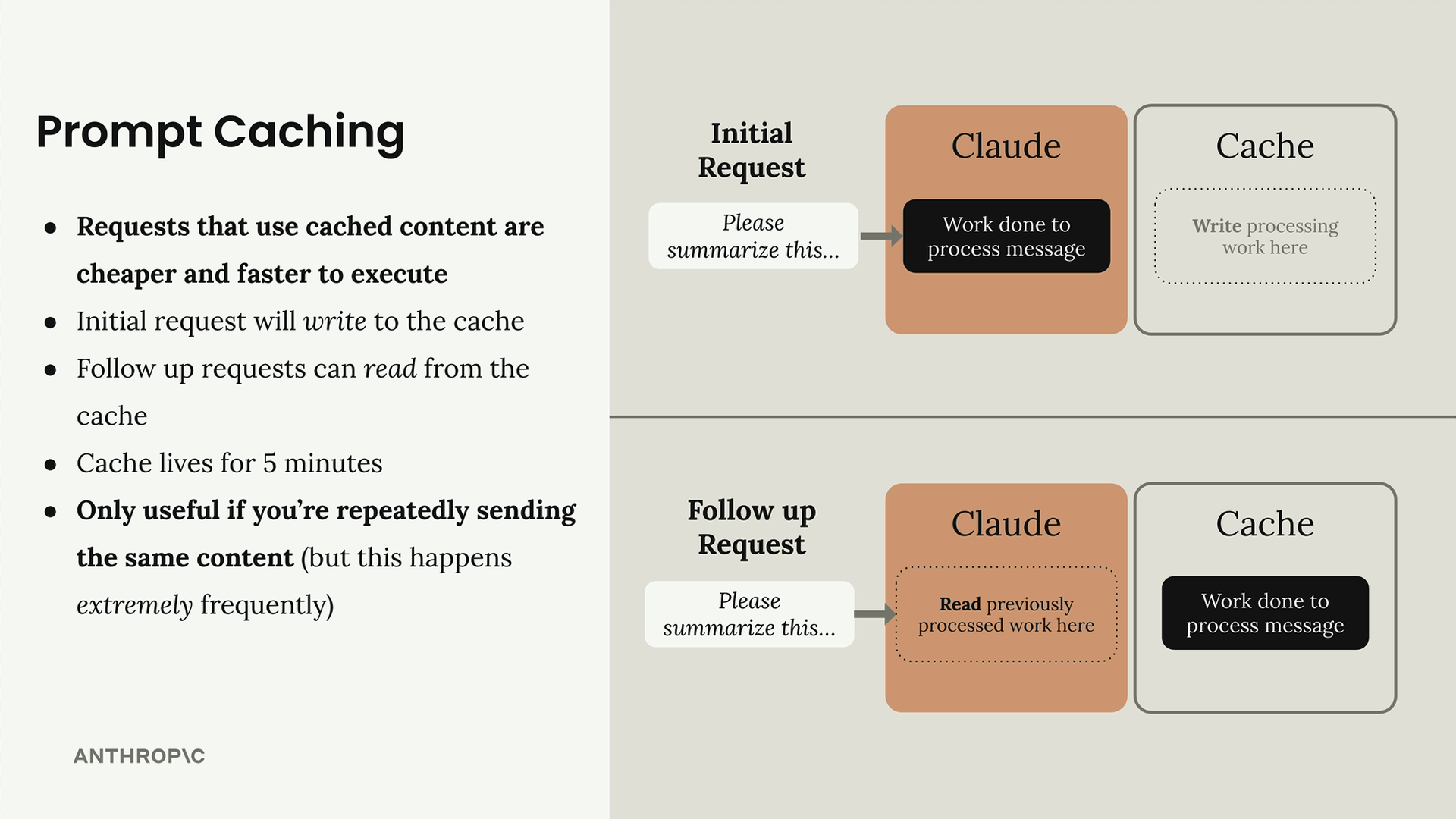
How Prompt Caching Works
When you mark content for caching, Claude processes it once and stores the result. Subsequent requests that include the exact same content can skip the processing step and read directly from the cache. This only works if the cached content is identical - even a single character change invalidates the cache.
You can set multiple cache breakpoints in a single request. The caching order follows this sequence:
- Tool schemas
- System prompt
- Message history
Setting Up Tool Schema Caching
To cache tool schemas, you need to add a cache_control field to the last tool in your list. Here's the proper way to do it without modifying your original tool schemas:
if tools:
    tools_clone = tools.copy()
    last_tool = tools_clone[-1].copy()
    last_tool["cache_control"] = {"type": "ephemeral"}
    tools_clone[-1] = last_tool
    params["tools"] = tools_clone
This approach creates copies of both the tools list and the last tool schema before adding the cache control field. This prevents accidentally modifying your original tool definitions, which could cause issues if you reorder tools later.
System Prompt Caching
For system prompts, you need to structure the system parameter as a list with a text block that includes the cache control field:
if system:
    params["system"] = [
        {
            "type": "text",
            "text": system,
            "cache_control": {"type": "ephemeral"}
        }
    ]
Understanding Cache Behavior
When you make your first request with cacheable content, you'll see cache_creation_input_tokens in the usage field. This shows how many tokens Claude wrote to the cache. On subsequent requests with identical content, you'll see cache_read_input_tokens instead.
If you have both cached and new content in the same request, you might see both cache reads and cache writes. For example, if you keep the same tool schemas but change the system prompt, you'll read the tools from cache while writing the new system prompt to cache.
Cache Invalidation
The cache is extremely sensitive to changes. Modifying even a single character in your tool schema description, system prompt, or any cached content will invalidate that cache entry. When this happens, Claude treats it as completely new content and creates a fresh cache entry.
This sensitivity means you should be thoughtful about what you cache. Tool schemas and system prompts that remain stable across many requests are ideal candidates. Dynamic content that changes frequently won't benefit from caching.
Practical Implementation
In practice, you'll want to build caching into your chat functions by default. Most applications use the same tool schemas and system prompts across multiple requests, making them perfect for caching. The performance and cost benefits are significant when you're making many requests with similar content.
Remember that caching is most valuable when you're repeatedly sending the same content. Since this happens extremely frequently in real applications - especially with tool schemas and system prompts - implementing caching early in your development process will pay dividends as your application scales.
Downloads
🔁 Related lessons
- Next: Quiz on features of Claude
- Previous: Rules of prompt caching
- Same section: Making a request · Multi-turn conversations · Chat exercise
- Part of paths: Path C
- Reference docs: Glossary · Skills atlas · By use-case
📚 Source & attribution
- Original Anthropic Academy lesson: https://anthropic.skilljar.com/claude-with-google-vertex/289200
- © 2025 Anthropic. Educational fair-use only.