📖 Lesson content
Summary
When Claude answers questions based on documents you provide, users might assume it's just pulling information from its training data. But what if Claude is actually citing specific sources? The citations feature lets you show users exactly where Claude found its information, building trust and transparency into your AI applications.
Why Citations Matter
Without citations, users see Claude's responses as coming from memory. They have no way to verify the information or understand that it's based on specific documents you provided. Citations solve this by showing users the exact source material Claude used to generate each part of its response.
Enabling Citations
To enable citations, add two fields to your document message:
{
  "type": "document",
  "source": {
    "type": "base64",
    "media_type": "application/pdf",
    "data": file_bytes,
  },
  "title": "earth.pdf",
  "citations": { "enabled": True }
}
The title field gives your document a name that appears in citations. The citations field with enabled: True tells Claude to track where it finds information.
Citation Structure
When citations are enabled, Claude's response becomes more complex. Instead of simple text, you get structured content with citation information:
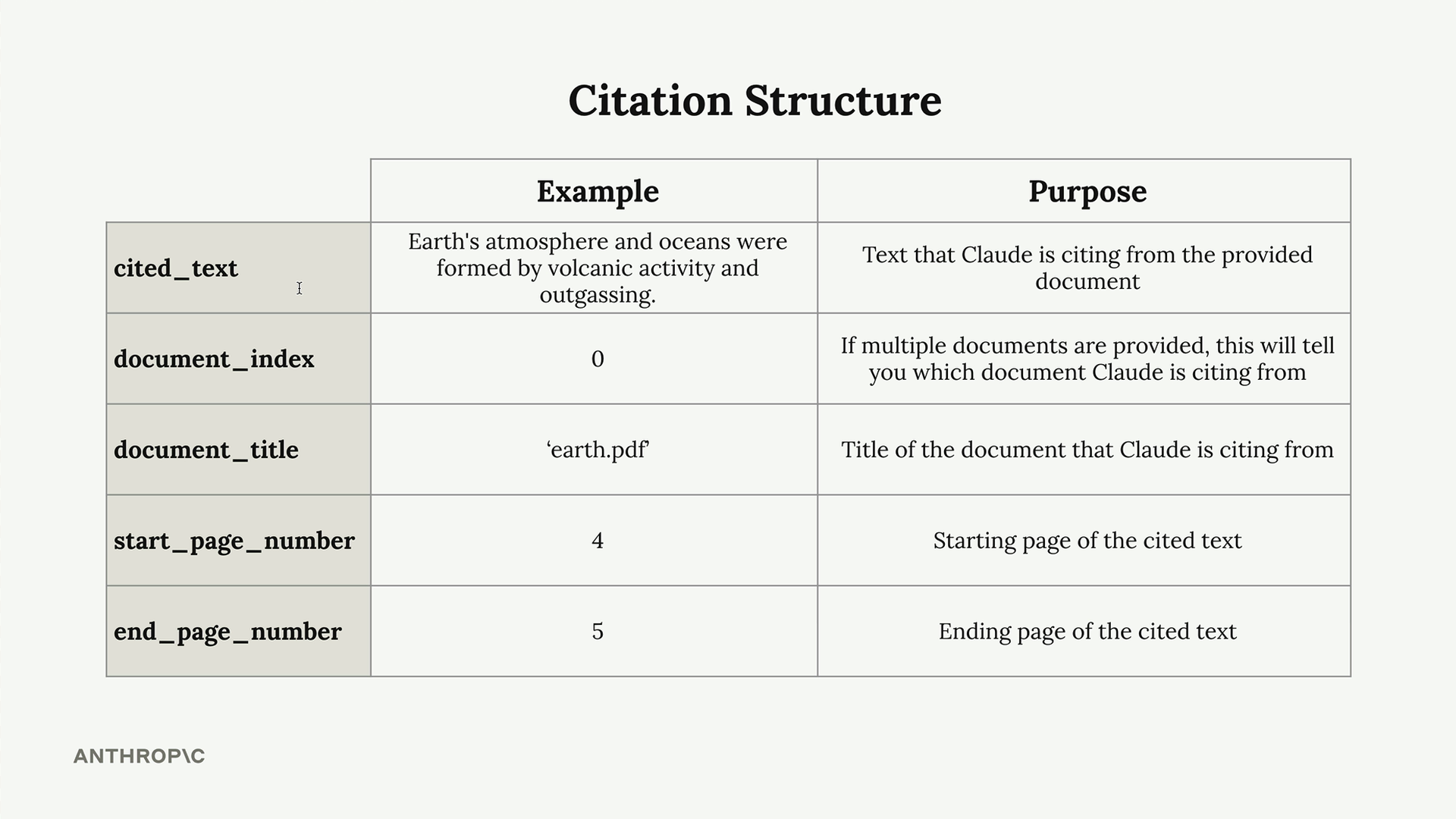
Each citation contains:
- cited_text - The exact text Claude is referencing from your document
- document_index - Which document (if you provided multiple)
- document_title - The title you assigned to the document
- start_page_number - Where the cited text begins
- end_page_number - Where the cited text ends
Building Citation Interfaces
The real power of citations comes from building user interfaces that display them. You can create numbered references in the text that link to detailed citation information:
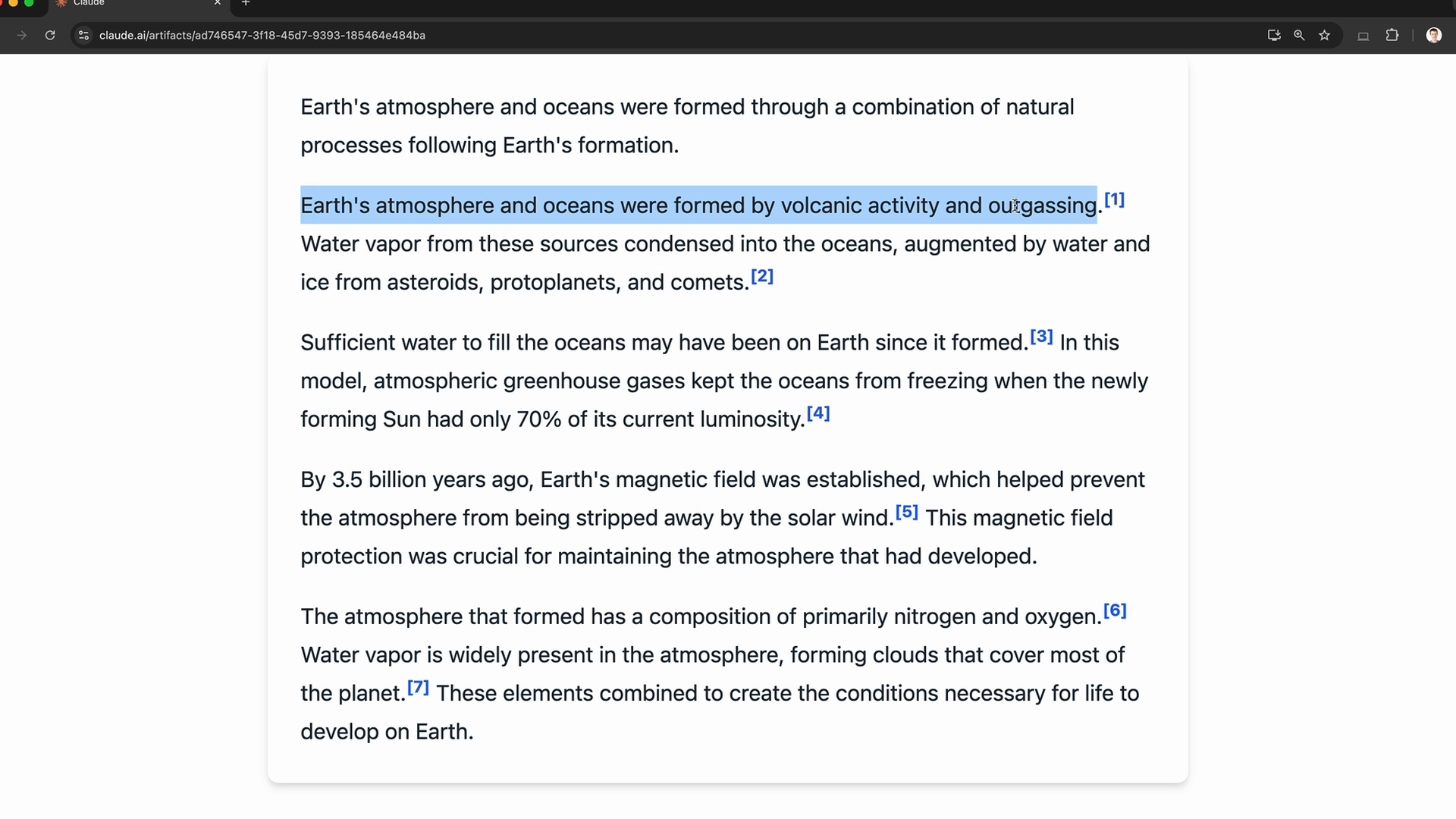
When users hover over or click citation numbers, they see exactly which document and pages Claude referenced. This transparency helps users verify information and builds confidence in Claude's responses.
Citations with Plain Text
Citations aren't limited to PDFs. You can also use them with plain text documents:
{
  "type": "document",
  "source": {
    "type": "text",
    "media_type": "text/plain",
    "data": article_text,
  },
  "title": "earth article",
  "citations": { "enabled": True }
}
With plain text, you get CitationCharLocation objects instead of page locations. These provide character positions within the text, allowing you to highlight the exact sentences or paragraphs Claude referenced.
When to Use Citations
Citations are essential when:
- Users need to verify information accuracy
- You're working with sensitive or important documents
- Transparency about sources builds trust in your application
- Users might want to read the original source material
By implementing citations, you transform Claude from a "black box" that gives answers into a transparent system that shows its work, making your AI applications more trustworthy and verifiable.
Downloads
🔁 Related lessons
- Next: Prompt caching
- Previous: PDF support
- Same section: Making a request · Multi-turn conversations · Chat exercise
- Part of paths: Path C
- Reference docs: Glossary · Skills atlas · By use-case
📚 Source & attribution
- Original Anthropic Academy lesson: https://anthropic.skilljar.com/claude-with-google-vertex/289202
- © 2025 Anthropic. Educational fair-use only.