📖 Lesson content
Summary
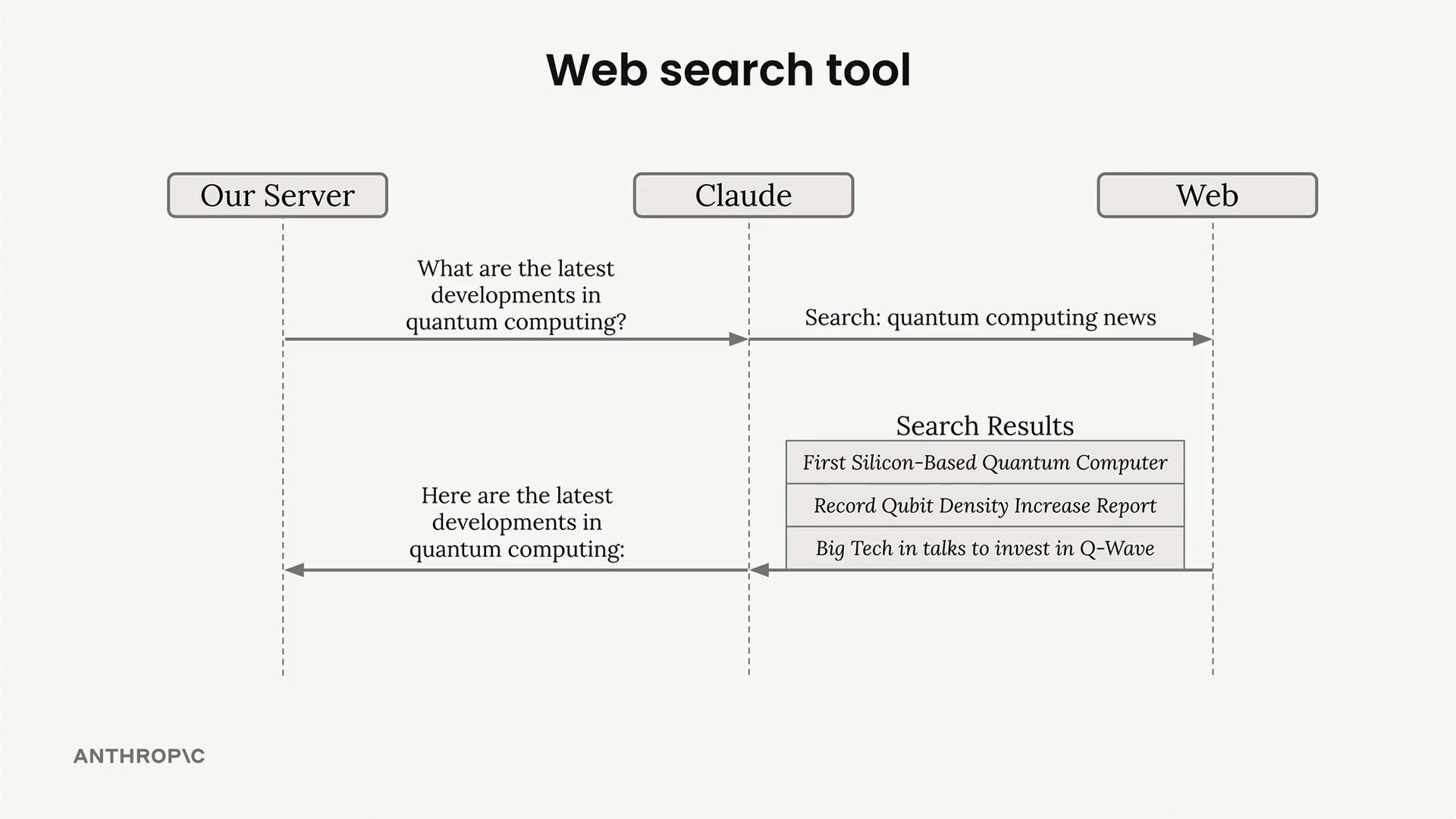
Claude includes a built-in web search tool that lets it search the internet for current or specialized information to answer user questions. Unlike other tools where you need to provide the implementation, Claude handles the entire search process automatically - you just need to provide a simple schema to enable it.
Setting Up the Web Search Tool
To use the web search tool, you create a schema object with these required fields:
web_search_schema = {
    "type": "web_search_20250305",
    "name": "web_search",
    "max_uses": 5
}
The max_uses field limits how many searches Claude can perform. Claude might do follow-up searches based on initial results, so this prevents excessive API calls.
How It Works
When you include the web search schema in your tools list, Claude will automatically decide when to search based on your question. For example, asking "What's the best exercise for gaining leg muscle?" might trigger a search for current fitness research.
The response contains several types of blocks:
- TextBlock - Claude's explanation of what it's doing
- ServerToolUseBlock - Shows the exact search query Claude used
- WebSearchToolResultBlock - Contains the search results
- WebSearchResultBlock - Individual search results with titles and URLs
- CitationsWebSearchResultLocation - Specific text citations supporting Claude's statements
Restricting Search Domains
You can limit searches to specific domains using the allowed_domains field. This is particularly useful when you want authoritative sources:
web_search_schema = {
    "type": "web_search_20250305",
    "name": "web_search",
    "max_uses": 5,
    "allowed_domains": ["nih.gov"]
}
This ensures Claude only searches trusted domains like government health sites instead of random fitness blogs with potentially unreliable information.
Rendering Search Results
The response structure is designed for rich UI rendering. You typically:
- Display text blocks as regular content
- Show web search results as a reference list at the top
- Render citations inline with links back to source material
- Highlight cited text to show how Claude supports its statements
This creates a transparent experience where users can verify Claude's sources and understand how it arrived at its conclusions. The citation system helps build trust by showing the evidence behind Claude's responses.
Downloads
🔁 Related lessons
- Next: Quiz on tool use with Claude
- Previous: The text edit tool
- Same section: Making a request · Multi-turn conversations · Chat exercise
- Part of paths: Path C
- Reference docs: Glossary · Skills atlas · By use-case
📚 Source & attribution
- Original Anthropic Academy lesson: https://anthropic.skilljar.com/claude-with-google-vertex/289183
- © 2025 Anthropic. Educational fair-use only.