📖 Lesson content
Video
The CLAUDE.md File
One of the most useful features in Claude Code is the CLAUDE.md file. It gives Claude Code persistent memory about your project.
The Problem It Solves
When you open Claude Code without a CLAUDE.md file, it starts fresh every time. It has to re-explore your codebase, figure out what dependencies are needed, and understand what features are already implemented. Sometimes it makes assumptions, which makes it harder to steer Claude in the right direction.
CLAUDE.md solves this. It's a Markdown file you add to the root of your project, and Claude Code reads it automatically every time you start a session. Think of it as an onboarding script for your codebase. The contents of the CLAUDE.md file are appended to your prompt.
An Example
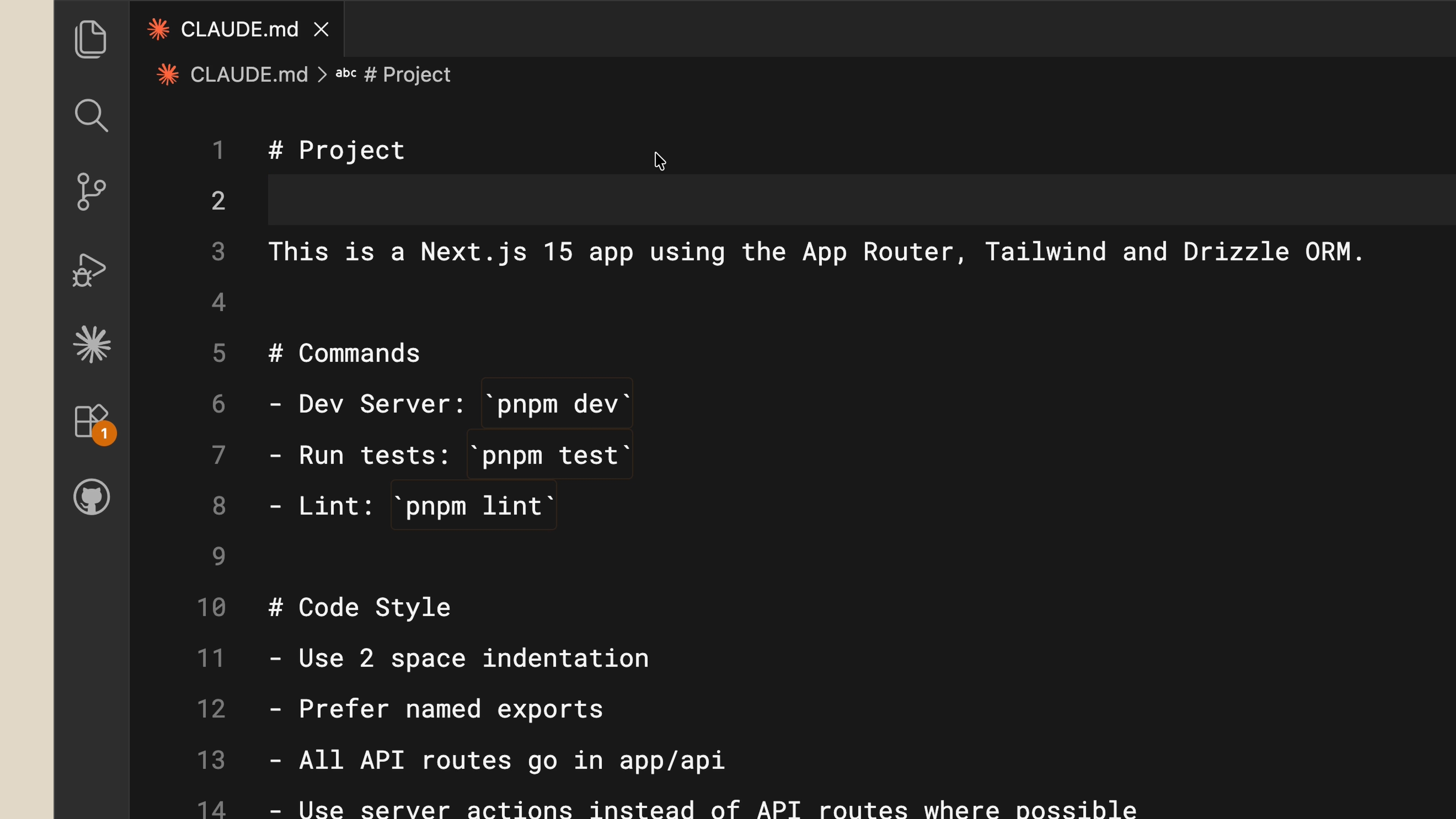
Here's what a typical CLAUDE.md file looks like:
This is a Next.js 15 app using the App Router, Tailwind, and Drizzle ORM.

- Dev server: `pnpm dev`
- Run tests: `pnpm test`
- Lint: `pnpm lint`

- Use 2-space indentation
- Prefer named exports
- All API routes go in app/api/
- Use server actions instead of API routes where possible
It's straightforward. Now if you ask Claude Code to create a React component, it already knows to use Tailwind for styling and to follow your code conventions.
CLAUDE.md is for Teams
You can (and should) commit your CLAUDE.md to version control so your team benefits from it. There's actually a hierarchy of memory files depending on who they're for:
-
Project-level CLAUDE.md lives in the root directory of your project. Shared with the team.
-
User-level CLAUDE.md lives in your configuration folder. This one is just for you and applies across all your projects. Put your personal preferences here.
Tips
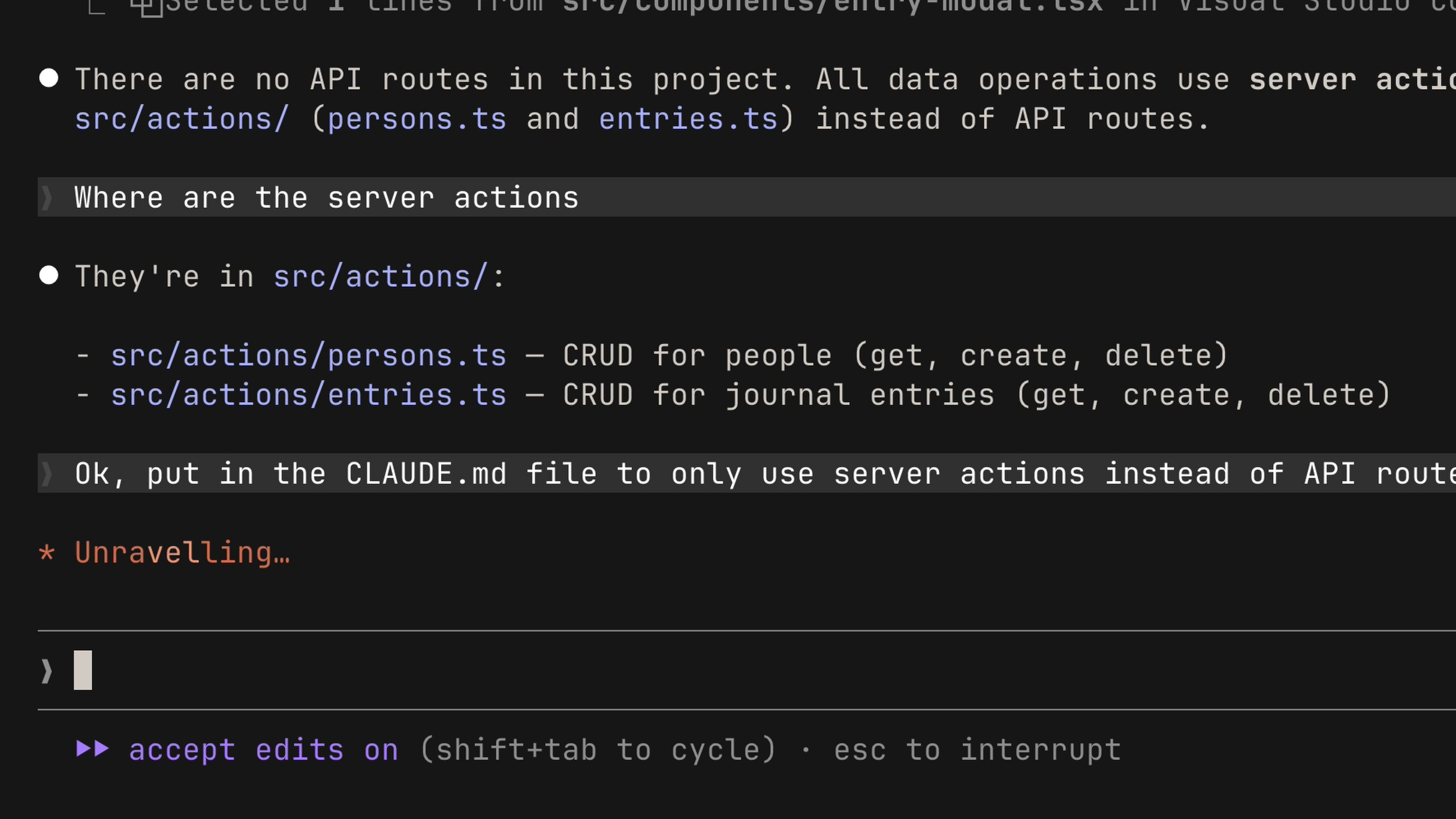
Save corrections to memory. If you find yourself correcting Claude repeatedly — like telling it to always use server actions instead of API routes — explicitly ask Claude to save that rule to memory. Next time you open the project, it'll know.
Reference project docs. If you have documentation in your project that you want Claude to reference, use the @ symbol with the file path:
## README.md

Please read if you need more info: @README.md
Start without one. We recommend starting a project without a CLAUDE.md file so you can see where you constantly have to course-correct the model. This keeps your CLAUDE.md compact and focused on only the necessary information. When you're ready, run /init to have Claude generate one for you.
Recap
The difference between a frustrating Claude Code session and a productive one often comes down to context — and the CLAUDE.md file is how you provide that context. Start with your stack, your preferences, and your commands, then build from there as you go.
🎬 Video transcript
Source video:
O0FGCxkHM-U
📜 Click to expand transcript (cleaned + AI-translated)
Introduction to CLAUDE.md
One of the most useful parts of Claude is the CLAUDE.md file. It gives Claude persistent memory about your project. When you open up Claude without a CLAUDE.md file, it has to start fresh every single time. It has to re-explore your codebase, understand what dependencies are needed, and identify the features that are already implemented. Sometimes, it has to make assumptions, which makes it harder for us to steer Claude in the right direction.
That’s where CLAUDE.md comes in. It is a Markdown file that you add to the root of your project, and Claude reads it automatically every time you start a session. It acts like an onboarding script for your codebase. Simply put, the contents of the CLAUDE.md file are appended to your own prompt.
Getting Started with the /init Command
You can run the /init command, which will make Claude generate a CLAUDE.md file based on your codebase. Let’s look at an example for a Next.js 15 app using the App Router, Tailwind CSS, and Drizzle ORM. The file might include:
- Commands: Dev server, run tests, lint.
- Code Style: Use two-space indentation, prefer named exports.
- Architecture: All API routes go in
app/api, use Server Actions instead of API routes where possible.
It is quite straightforward. Now, if I ask Claude to create a React component, it already knows how to style it with Tailwind or any other CSS framework I am using. Claude does a better job right off the bat versus having to manually understand where everything is first.
Hierarchy of Memory Files
You can share this file in your version control for your team to use, but there is actually a hierarchy of memory files depending on who they are for:
- Project Level: The
CLAUDE.mdthat lives in the root directory of your project. - User Level: A
CLAUDE.mdfile that lives in your configuration folder. This one is just for you and applies across all your projects. You should put your personal preferences here, such as how you prefer to write code comments.
Tips for Effective Context Management
To get the most out of Claude's memory, follow these three tips:
- Explicit Saving: If you have to correct Claude to do something—like always using Server Actions instead of API routes—explicitly ask Claude to save this to memory. This ensures that when you return to the project, it will remember every single time.
- Referencing Documentation: If you have docs in your project that you want Claude to reference, just use the
@symbol with the file path. - Iterative Refinement: We recommend starting a project without a
CLAUDE.mdfile initially. This allows you to see where you have to constantly course-correct the model. This practice keeps yourCLAUDE.mdfile compact, containing only the necessary information that Claude needs to work effectively.
Conclusion
The difference between a frustrating AI session and a productive one comes down to context. The CLAUDE.md file is how you provide that context. Start with your stack, your preferences, and your commands, and then build from there as you go.
🔁 Related lessons
- Next: Subagents
- Previous: Code review
- Same section: Subagents · Skills · MCP
- Part of paths: Path C
- Reference docs: Glossary · Skills atlas · By use-case
📚 Source & attribution
- Original Anthropic Academy lesson: https://anthropic.skilljar.com/claude-code-101/469795
- © 2025 Anthropic. Educational fair-use only.