📖 Lesson content
Summary
Resources in MCP allow your server to expose information that can be directly included in prompts, rather than requiring tool calls to access data. This creates a more efficient way to provide context to AI models.
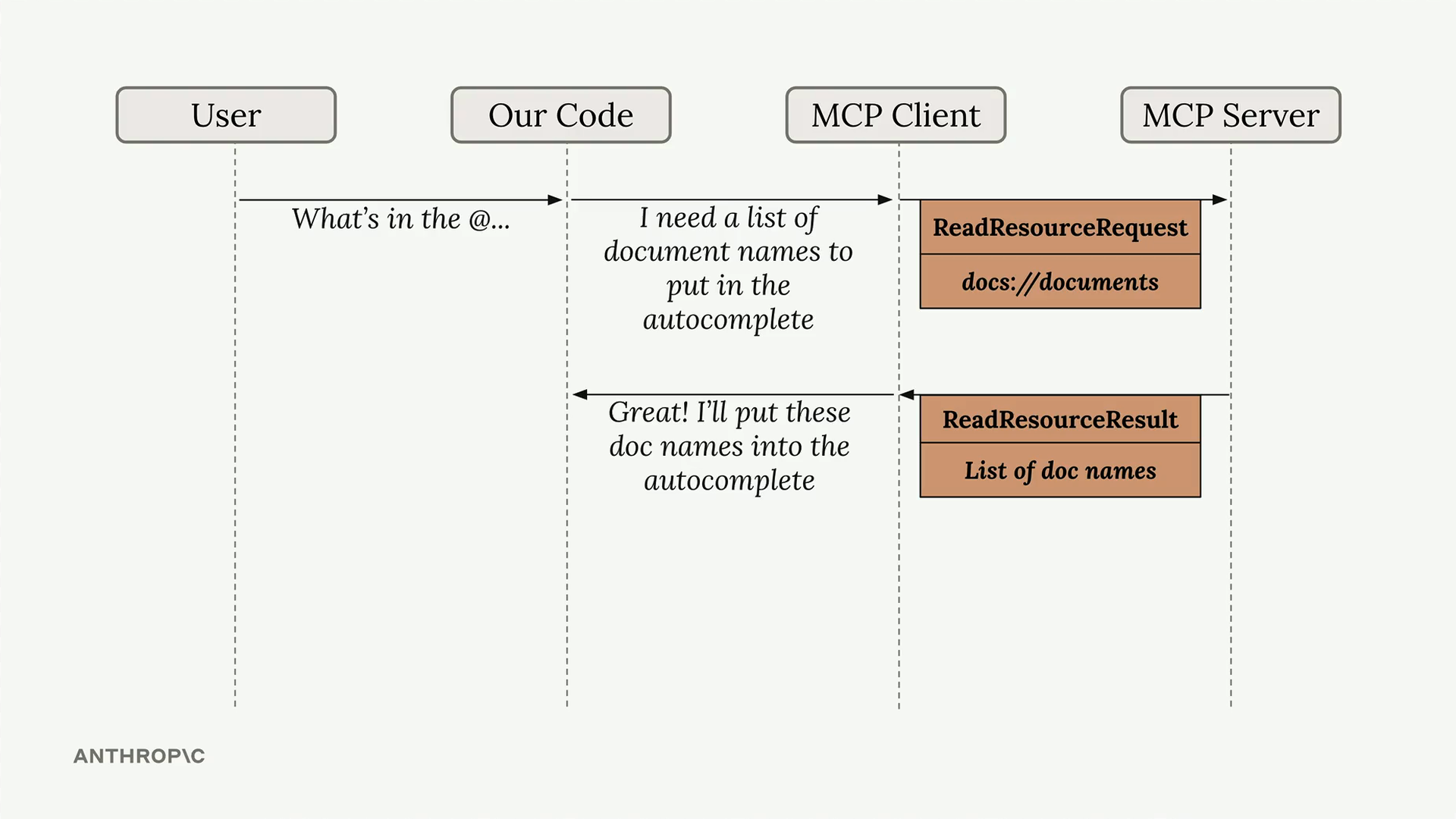
The diagram above shows how resources work: when a user types something like "What's in the @..." our code recognizes this as a resource request, sends a ReadResourceRequest to the MCP server, and gets back a ReadResourceResult with the actual content.
Implementing Resource Reading
To enable resource access in your MCP client, you need to implement a read_resource function. First, add the necessary imports:
import json
from pydantic import AnyUrl
The core function makes a request to the MCP server and processes the response based on its MIME type:
async def read_resource(self, uri: str) -> Any:
    result = await self.session().read_resource(AnyUrl(uri))
    resource = result.contents[0]

    if isinstance(resource, types.TextResourceContents):
        if resource.mimeType == "application/json":
            return json.loads(resource.text)

    return resource.text
Understanding the Response Structure
When you request a resource, the server returns a result with a contents list. We access the first element since we typically only need one resource at a time. The response includes:
- The actual content (text or data)
- A MIME type that tells us how to parse the content
- Other metadata about the resource
Content Type Handling
The function checks the MIME type to determine how to process the content:
- If it's
application/json, parse the text as JSON and return the parsed object - Otherwise, return the raw text content
This approach handles both structured data (like JSON) and plain text documents seamlessly.
Testing Resource Access
Once implemented, you can test the resource functionality through your CLI application. When you type "@" followed by a resource name, the system will:
- Show available resources in an autocomplete list
- Let you select a resource using arrow keys and space
- Include the resource content directly in your prompt
- Send everything to the AI model without requiring additional tool calls
This creates a much smoother user experience compared to having the AI model make separate tool calls to access document contents. The resource content becomes part of the initial context, allowing for immediate responses about the data.
🔁 Related lessons
- Next: Defining prompts
- Previous: Defining resources
- Same section: Introducing MCP · MCP clients · Project setup
- Part of paths: Path D
- Reference docs: Glossary · Skills atlas · By use-case
📚 Source & attribution
- Original Anthropic Academy lesson: https://anthropic.skilljar.com/introduction-to-model-context-protocol/296695
- © 2025 Anthropic. Educational fair-use only.